
Five apps. One training chain from the manual to the device.
Fracto connects everyone who trains on a medical device: the manufacturer who writes the course, the distributors who take it to market, the hospital that assigns it and the nurse who learns at the device. Here is every app and what it can do.

How the apps work together.
A course is written once in Studio, travels through Channel to every market, is assigned in Campus and learned in the Player. Learning status and feedback travel back. Hub holds every workspace together.
 Studio Create and approve the course. For course authors Approved version
 Channel Release the course to markets and distributors. For sales and partner enablement Courses and learner seats
 Campus Assign courses and document every device training session. For training teams in hospitals Assigned courses
 Player Learn on the phone, ask the tutor. For learners
Learning status · feedback · requests
Fracto StudioFor course authors
From the manual to an approved course.
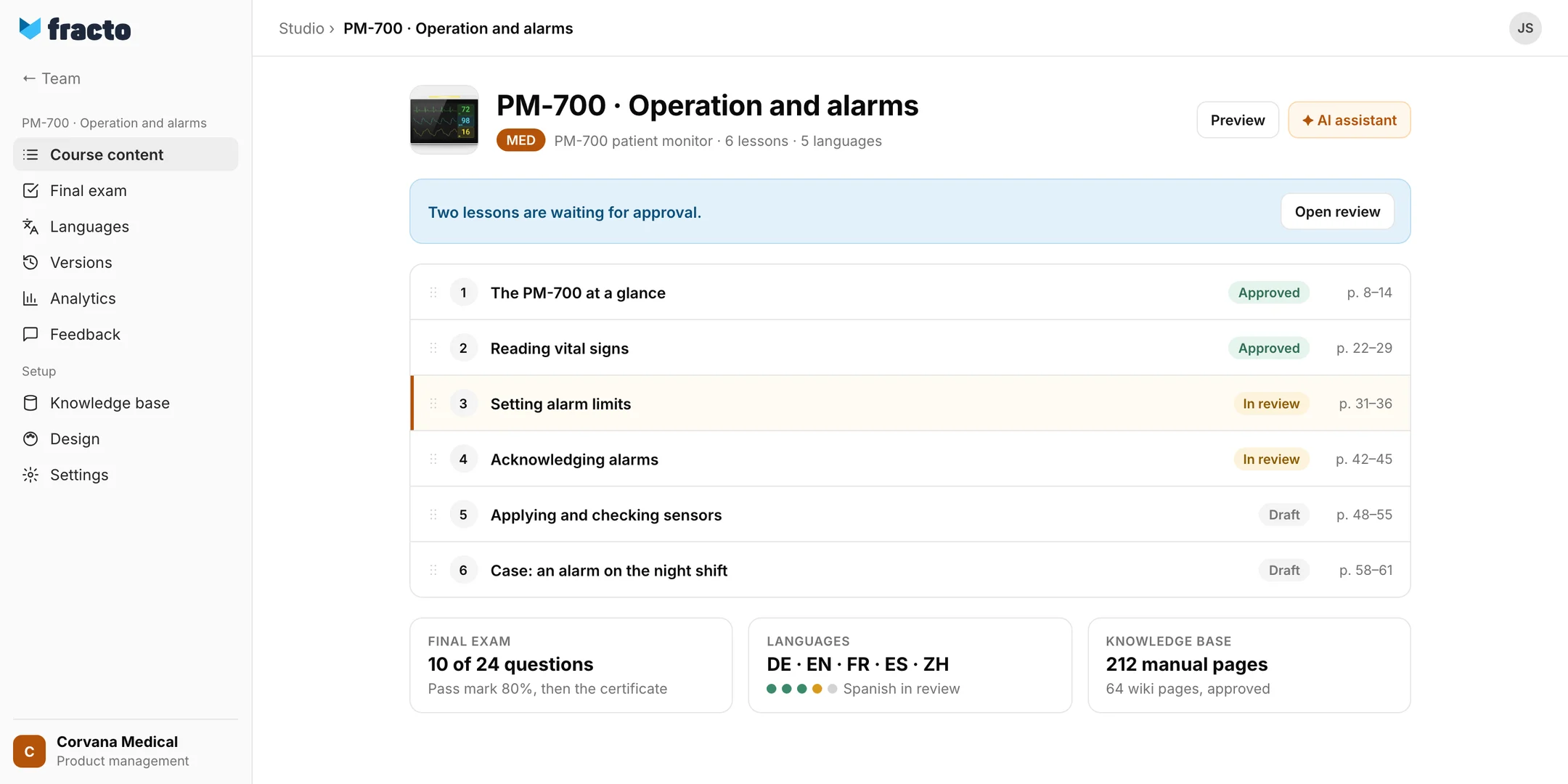
Studio turns manuals, slides and videos into interactive courses, translates them and publishes them only after your experts have approved them.
More for course authors
Create
AI course wizard
Five steps from source to course: choose manuals, videos, texts or web pages, set the goal, check the outline, generate, enrich.
PDF and PowerPoint import
Every page or slide becomes a lesson in its original layout. Empty pages are left out.
Video to course
Upload a video or use its subtitles. The AI proposes chapters, learning objectives and a question for each chapter.
Knowledge base
Manuals are captured page by page, including scanned pages, images and audio. Every page carries its review status.
86 block types
Hotspots on the device photo, flashcards, sorting, timelines, processes, quizzes, video, audio and H5P.
AI blocks and exam questions
The AI drafts blocks, knowledge checks and exam questions and shows its sources. Your experts confirm each question.
Narration
Voice-over with six text-to-speech voices, your own audio file or a recording in the browser.
Course design
Brand colour, start page, navigation, playback speed and reading confirmation, set per course.
Translate and approve
Translations with review
AI draft, translation editor, review, then publication, language by language. A separate video per language.
Rise courses in new languages
Imported Articulate Rise packages go through the same translation and review path. No rebuild needed.
Review and approval
A named reviewer checks a frozen snapshot and comments in context. When review is required, nothing goes live without approval.
Versions
Every publication is a frozen version. Earlier versions and deleted chapters, lessons or blocks can be restored.
Publish and improve
Update notice
Before you publish, Studio shows which institutions and learners are affected. They are told about the new version.
Course insights
Answers and error rates per question, use by institution and version, learner progress.
CE and CPD
Final exam from the video, CE credits and provider on the certificate, course evaluation and roster export.
SCORM 1.2 export
Any published version and language as a SCORM package for your customer's LMS.
Forum and feedback
A moderated course forum. Feedback from hospitals arrives in Studio and is answered there.
Fracto ChannelFor sales and partner enablement
Your course reaches every market.
Channel maps your sales network: regions, your own teams, distributors and the hospitals they serve. Courses and learner seats travel down, learning status comes back.
More for sales and partners

Network and access
Sales network
Regions, teams, distributors and institutions in one network. Move distributors between regions, add hospitals with their Campus lead.
Learner seats
A pool per manufacturer and distributor, quotas per region, distributor, team and hospital. Requests for more seats come to you for a decision.
Product catalogue
Courses become products and product groups with tags and language versions. Every assignment shows its effect first.
Invitation with role
An invitation sets the role and the tasks in one step. Partners are ready to start right away.
Contact and overview
Partner messages
Write to distributors by selection, region or team. In-app and by email, with delivery and read status.
Channel analytics
Progress and compliance by region, team, distributor and institution, plus feedback. Export as Excel, CSV or PDF.
Pause or end delivery
When a partnership ends, you pause or end the delivery to an institution.
Partner API
Connect Fracto to your CRM or ERP. You decide what each access key may do.
Fracto CampusFor training teams in hospitals
Every shift trained, every session on record.
Campus is the hospital's training office: who has to learn what by when, live sessions at the device, and the evidence for the next audit.
More for training teams

Plan and assign
Training matrix
Roles and learning paths give every person their duties with due dates. Renewals come back on schedule, reminders go out when a duty is overdue.
Live trainingPartly Campus Full
Multi-day sessions with agenda, registration, self-cancellation, attendance and material, managed with your lecturers. Session quiz, feedback and recordings with consent are part of Campus Full.
Several manufacturers
Learner seats from several manufacturers and distributors side by side. Staff use one login for all of them.
Your own catalogueCampus Full
Your own courses as a voluntary offer for everyone, for roles or departments, separate from mandatory training.
Your own SCORM courses
Upload existing SCORM courses, offer them in the catalogue and issue the same certificates.
Run and prove
Compliance and evidence
Compliance by team, teams side by side, exam results per person with attempts and certificate. Exports are encrypted and limited to your scope.
Person record
Courses, attempts, fulfilled duties with date and certificates for every person. Certificates are kept even after an account is deleted.
Announcements
A notice on the learners' start page for the audience you choose, such as a ward or a role.
Onboarding and import
Import staff from Excel or CSV, invitation links, access requests with approval. Team leads invite within their team quota.
Learner view
See the Player read-only, exactly as your staff see it.
Your own branding
The institution appears in its own look or in that of the workspace.
Fracto PlayerFor learners
Learn the device in minutes, on the phone.
The Player is where nurses, physicians and technicians learn: on the ward, between two patients, in their own language.
More for learners
Learn and ask
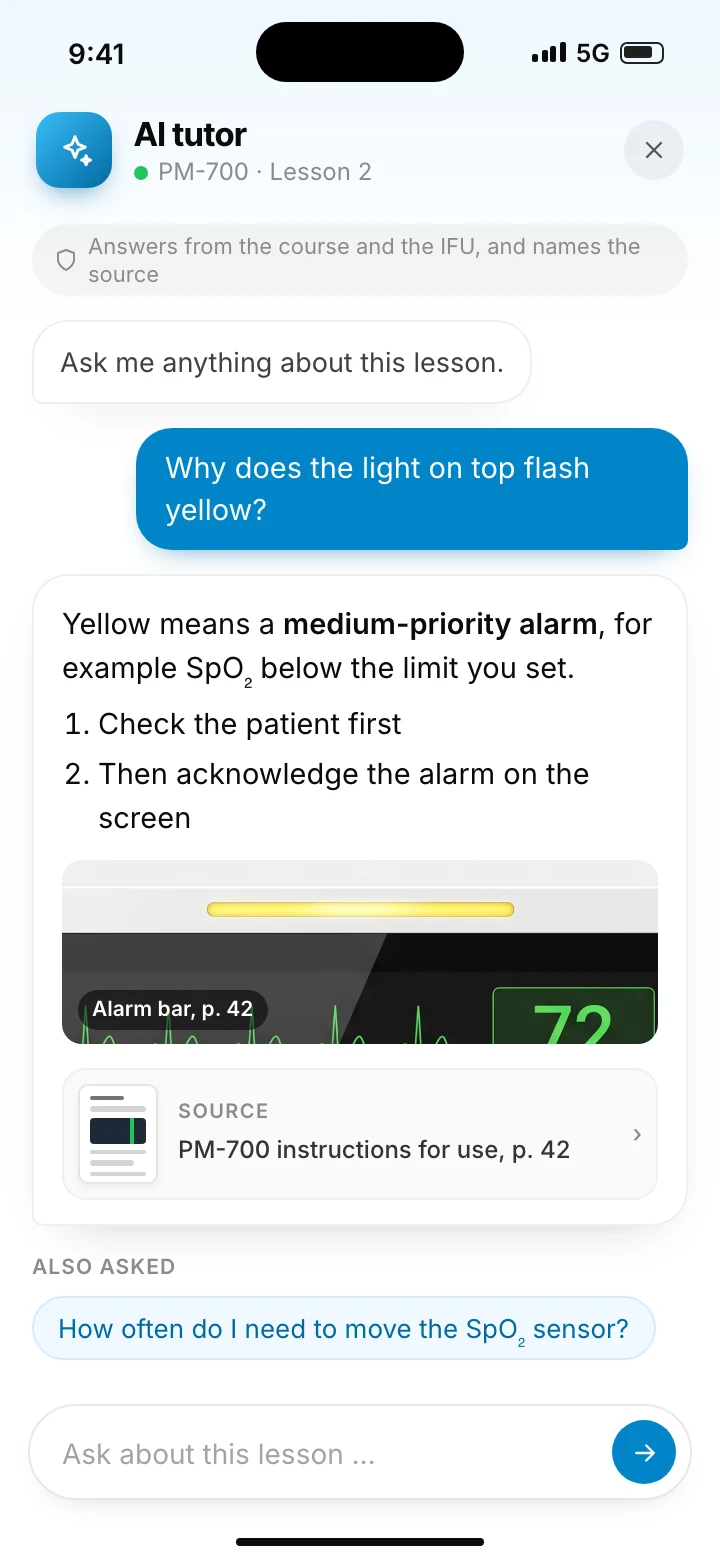
AI tutor with sources
Answers only from the published course version and approved manual sources. Every answer names its source, down to the page.
Tutor safety checkSwitch per workspace
Emergencies, patient advice, exam questions and off-topic requests get a fixed answer. Answers are checked against their sources, a missing warning is added.
Practice with the tutor
The tutor asks questions and rates the answer as complete, partial or wrong.
Phone and desktop
In the browser on any device, light or dark. Learning continues at the last lesson and video position.
Prove and keep
Certificates and badges
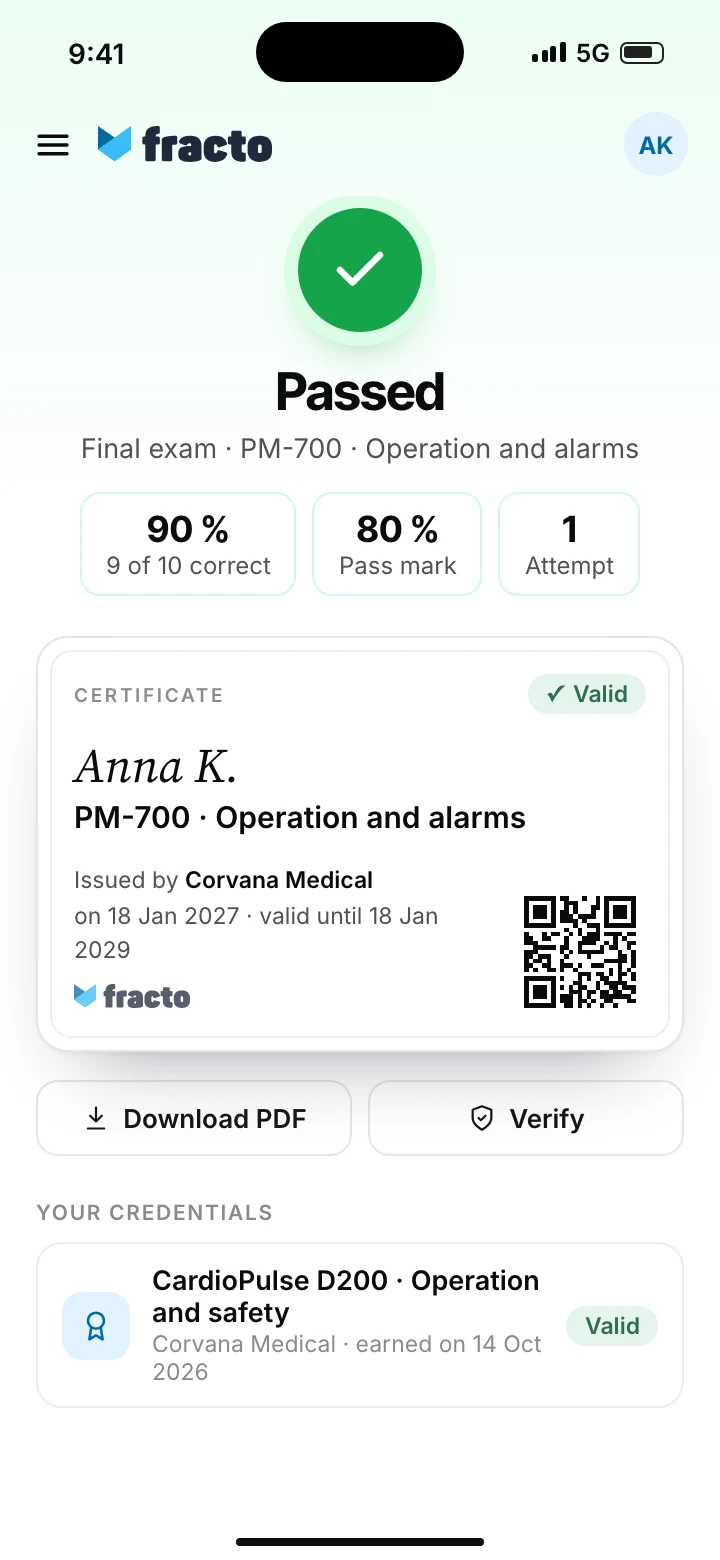
Certificate PDF with QR code, public verification page, Open Badges 3.0, sharing on LinkedIn, reminder before it expires.
One personal library
One person, the courses of every institution and manufacturer in one place. Sessions can be booked across institutions.
In the learner's language
App, Player and emails in German, English, Spanish, French, Dutch, Norwegian, Polish, Romanian and more.
Data rights
Learners download their personal data package or delete their account themselves.
Fracto HubFor workspace admins
One workspace, every app in view.
Hub is the admin centre of every workspace: who may use which app, how your organisation appears, and what your agreement covers.

People and organisation
People and access
A directory of everyone with app, role, internal or external and status. Invite with role and tasks.
Organisation
Master data, languages and region, message templates and certificate profiles.
Branding and domains
Verified own domains, your branding at login, your sender name and logo in every email.
Agreement and control
Contract and usage
Agreement, term, seats and requests for more capacity in one place.
AI credit
Prepaid AI credit per workspace with a usage view. Every AI action is counted.
Activity log
Security and role changes are logged and cannot be removed afterwards.
API tokens
Access keys for connected systems, each limited to what it may do.
Under every app, the same foundation.
All five apps run on one platform. That is why a course, a person and a record stay the same thing, from the manufacturer to the ward.
- One person, one login
- A nurse keeps one account for the courses of every hospital and manufacturer.
- Customers kept separate
- Every workspace is its own customer. Data never mixes between them.
- Frozen versions
- Learners always get an approved, published version, never a draft.
- Changes on record
- Changes to courses, roles and training records are logged.

Let us show you the platform.
Tell us about your devices, your markets and the people you train. A founder replies personally, usually within two working days.
Talk to us