
Practise with the tutor
How to practise with the AI tutor's check questions, see at once whether your answer is right, and spot what is still open.
When you practise, the AI tutor asks you check questions from your course and tells you at once whether your answer is right.
Before you start
- Practising is part of the course, in the AI tutor window. “Ask the AI tutor” explains how to open it. If the button is missing, the tutor is switched off for this course. During an exam it is locked.
- The tutor does not make up the questions. They are check questions from the lessons that are not part of the final exam and for which the course shows the correct answer.
- Your answers do not count towards the final exam. They only feed your practice progress.
How to practise
-
Open a lesson or the course page and click AI tutor. After an exam there is a second way in: the result screen has Practice with the tutor. The button is always there. If the tutor is switched off for the course, you land on the course page without a tutor. Otherwise the practice round is already open: continue with step 3.
-
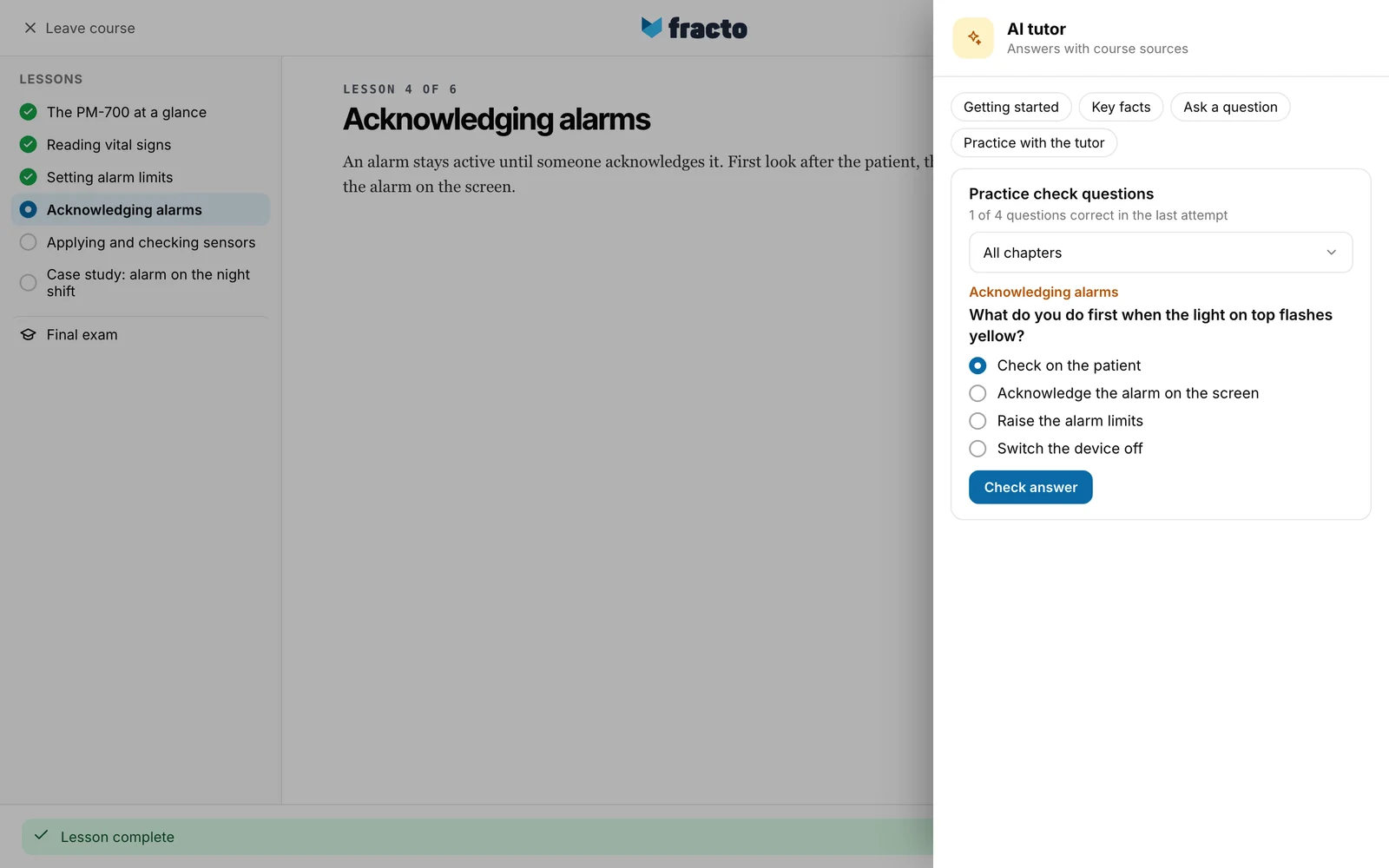
In the tutor window click Practice with the tutor. The button stays grey while the tutor is still loading your conversation. Practice check questions appears below it with a line such as “1 of 4 questions correct in the last attempt”. The round starts at the first question you have not yet answered correctly.
-
If the questions come from more than one chapter you can pick a chapter. Without a choice it says All chapters. Above the question, an orange line names the chapter it belongs to.
-
Choose your answer. Round fields mean exactly one answer is right. Square boxes mean several answers can be right: tick all that apply.
-
Click Check answer. The button only becomes active once you have chosen something.
-
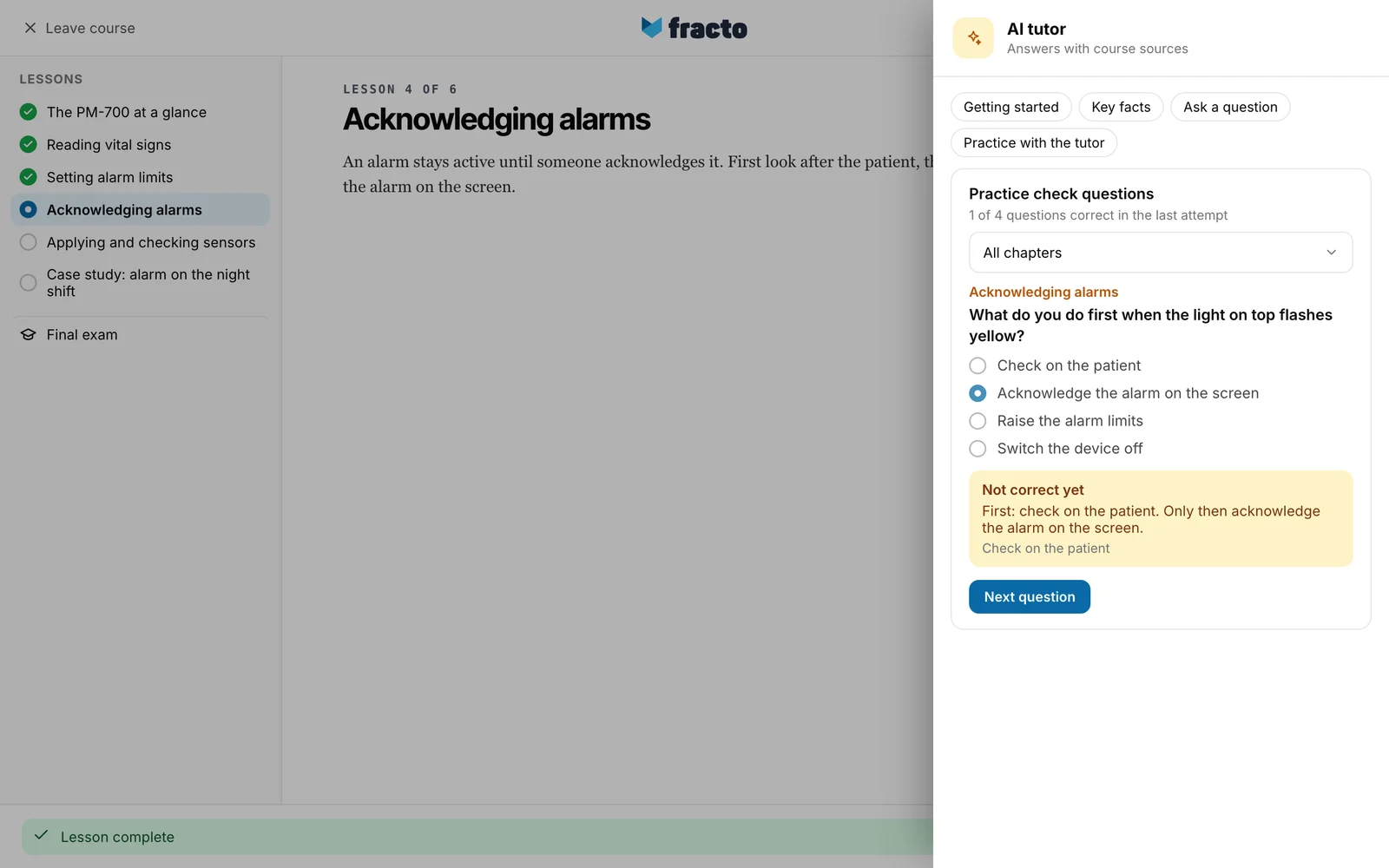
Read the result: Correct or Not correct yet, with a short comment below. With Not correct yet the correct answers are shown as well. For several correct answers, the question only counts as correct if you chose all the right ones and none of the wrong ones.
-
Click Next question. Questions you have not answered correctly yet come first. Once all are correct, it simply goes on in order.
You can tell it worked when the number in the line ”… questions correct in the last attempt” goes up when you answer an open question correctly. It only counts the chosen chapter.
What happens next
- Your latest answer is the one that counts. If you get a question wrong later, it counts as open again.
- The practice progress belongs to your tutor conversation for this course version. If you do not use the tutor for 30 days, the progress starts afresh the next time you open it. Start again or Delete conversation also removes it. Those two links only appear once the conversation has messages. Someone who only practises and never asks a question therefore cannot reset the practice progress themselves. A new course version starts from zero.
If it does not work
| Message | What it means |
|---|---|
| No approved check questions are available for this course version yet. | The course has no practice questions. Ask the tutor a question instead. |
| The practice round could not be loaded at this time. | The round did not load or your answer was not sent. Click Try again. The round reloads and your choice is lost. |
| Your session could not be loaded or saved securely at this time. | The tutor did not load your conversation. Practice with the tutor then stays grey. Click Try again in the message. |
Checked on 6 November 2026 against the current Fracto release.
