Content sources: where your courses come from
How Campus sorts learning content by origin: publishers, Studio, live recordings and external content, with learner places and permissions.
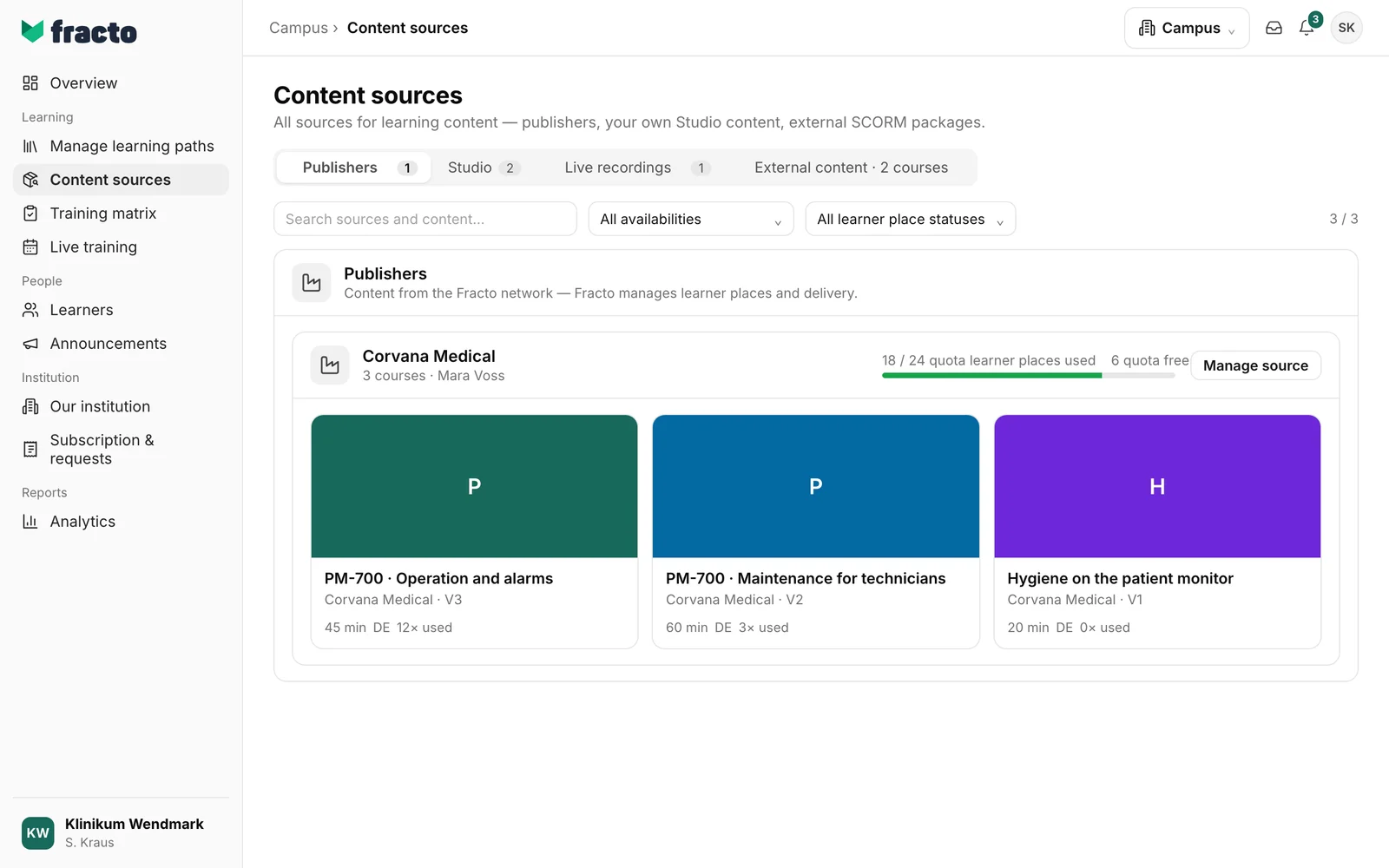
Content sources shows all the courses your institution can use, sorted by where they come from. The origin decides who maintains the content and which learner places it needs.
The four sources
There are up to four tabs at the top, three with Campus Light. Each shows how many courses belong to it. For External content the number is part of the tab name.
- Publishers: courses from manufacturers in the Fracto network. The app says: “Content from the Fracto network — Fracto manages learner places and delivery.” For each manufacturer you see how many learner places are used and how many are free. Manage source opens the details of the source. Campus managers also request more learner places there. The request goes to Fracto sales and does not unlock anything by itself. If your institution has no publisher content yet, it says: “No publisher content yet.”
- Studio: courses your institution created and published itself in Studio, shown as “Studio-produced courses”. This comes with Campus Full. With Campus Light the tab exists, but Studio is missing. Without Studio, the tab shows Campus managers a “Not booked” card with the option to request an offer. See “Create your own courses”.
- Live recordings: published recordings of your live trainings. The tab exists only with Campus Full. Without recordings it says “No recordings yet”. See “Publish a recording of a session”.
- External content: SCORM packages you uploaded yourself, with the number of courses in the tab name. See “Upload a SCORM package”. If external content is not set up for your institution, it says: “External content is not available for this institution.”
Learner places per source
Not all content needs the same learner places:
- A manufacturer’s learner places are tied to that manufacturer’s content.
- Learner places for own content cover internally produced content, live recordings and Studio courses. Uploaded SCORM packages use them too: “Learners use a learner place for own content.”
You can see how many learner places your institution has under Subscription & requests. On the course cards you see how often a course is used (“× used”).
Search and filter
Above the list, search with “Search sources and content…” and filter by availability and learner place status, for example “learner places limited”, “No free learner places” or “Externally licensed”. Reset clears the filters. If nothing matches, it says “No matching content found”.
What you do here and what you do not
- Here you manage sources and upload SCORM packages. You can open and view a course here, but not put it into a learning path. That happens under Manage learning paths. See “Create a learning path”.
- Campus managers can upload and request learner places. Department leads see the catalogue read-only. For them it says “View only” at the top with the note: “With your role you see the content catalog as read-only. Reallocation, waitlist priorities, and catalog changes are not available.”
- Publisher content and SCORM upload are also available with Campus Light. Studio courses and live recordings belong to Campus Full.
Checked on 6 November 2026 against the current Fracto release.
