
Send a message to partners
How to write to partner leads and main contacts in Channel, check the recipients beforehand and see delivery and read status afterwards.
With Message partners you write to the leads of your partners. The message appears as a notification in Fracto and, if you want, as an email as well. Later you can see who received and read it.
This is not an announcement to learners. You cannot reach learners with it.
Before you start
- Only appointed leads may send: the network lead to all partners and a region lead to the partners of their region. Team leads and partner leads cannot send. If you may not send, you do not see the Message partners button.
- You can choose partners whose collaboration is active or ends on a set date. Paused and ended partners are missing, and so are partners whose collaboration only starts in the future. Under Teams you find only partner teams.
- Recipients are the partner leads with active access. If you want, main contacts who are linked to a person in Fracto are added.
Send a message
-
In Channel, open Network & learner places and click Message partners at the top. The dialog opens on Compose.
-
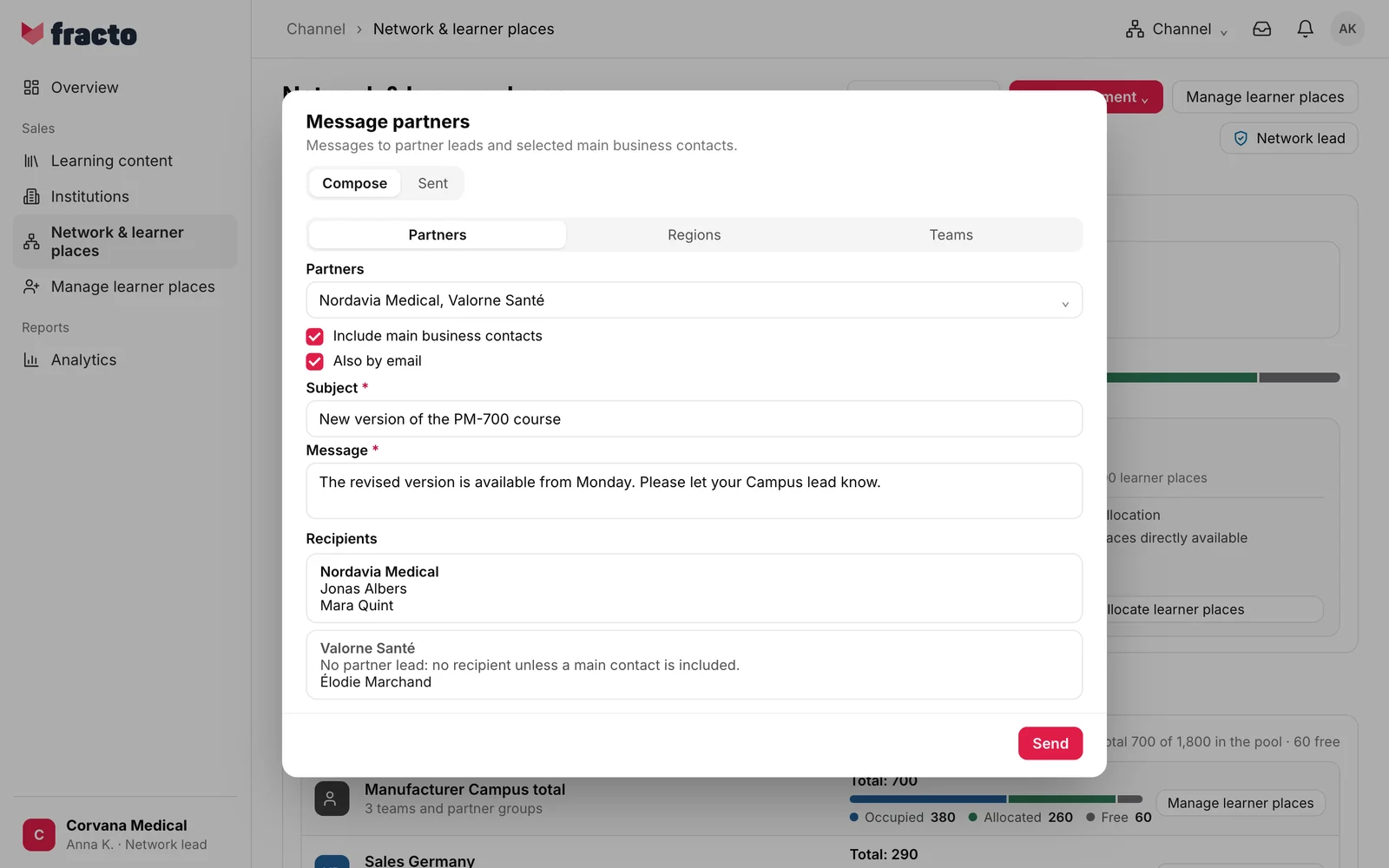
Choose what you address: Partners (preselected), Regions or Teams. With regions and teams you reach all partners there. Only one of these kinds applies per message; switching clears the selection.
-
Choose the entries. Under Recipients you then see for every partner who receives the message.
-
If needed, tick Include main business contacts. It is off. A main contact who is not linked to a person in Fracto is not a recipient; it says “No recipient” there.
-
If needed, tick Also by email. It is off. Without it, recipients only get the notification in Fracto.
-
Enter the Subject (at most 200 characters) and the Message (at most 10,000 characters). Both are required.
-
Click Send. The button is active only once there is at least one recipient, a subject and a message. A sent message cannot be recalled or changed.
The notes under Recipients are not errors. “No partner lead: no recipient unless a main contact is included.” means this partner has no partner lead. The note also stays when you include main contacts; whoever is listed below it receives the message, otherwise nobody.
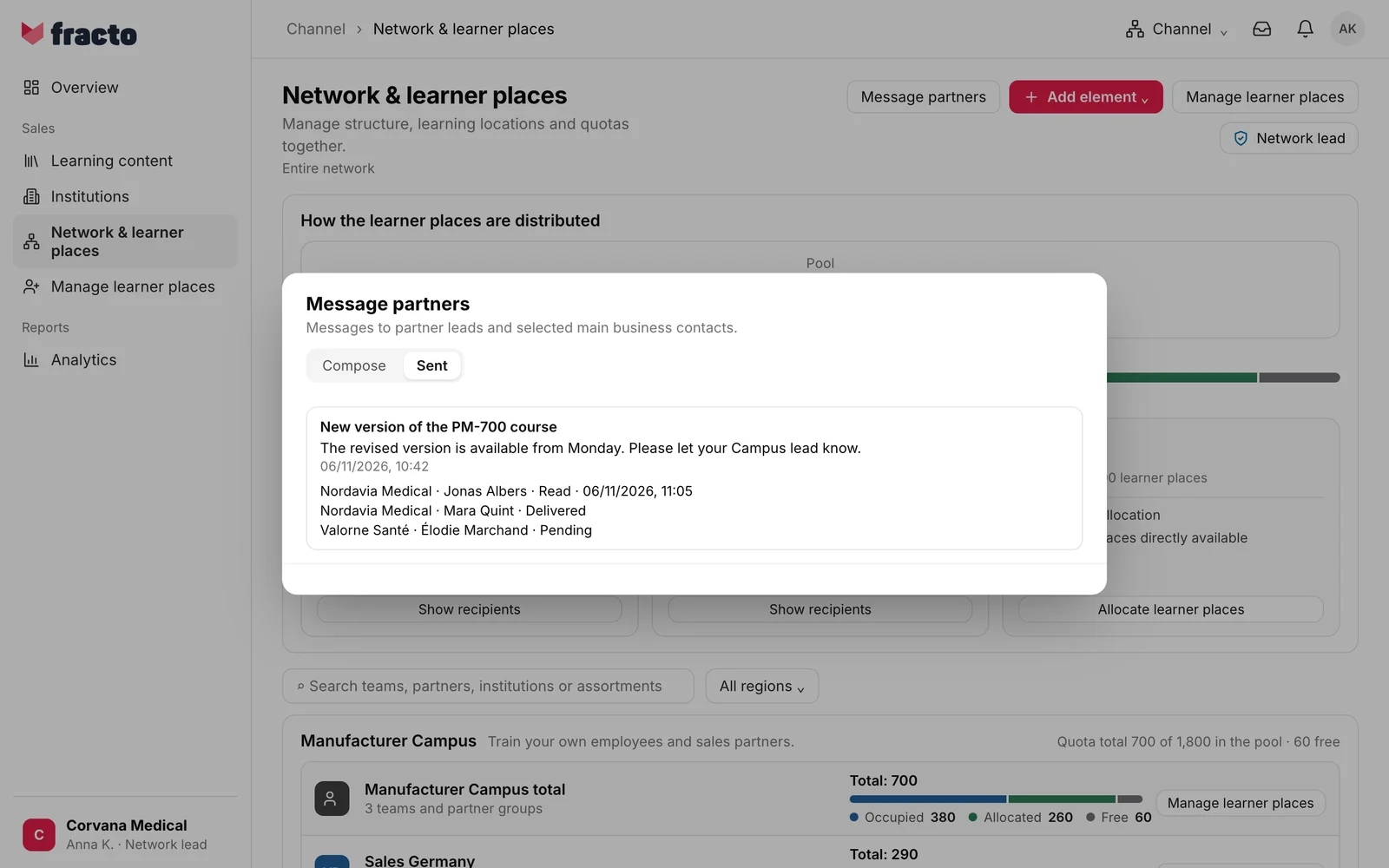
You know it worked when the dialog switches to Sent and your message is at the top. Each recipient shows partner, person and a status:
- Pending: no notification was created for this person, for example because of their notification rules. This usually does not change any more.
- Delivered: the notification is with the person.
- Read: the person has opened the message or marked it as read. The time follows.
What happens next
- Every recipient receives a notification with your subject. It opens the message in the inbox. Recipients do not see who else was written to.
- With Also by email, an email with subject and text goes out as well, in the person’s language and with your workspace as the sender. A button in it opens the message in the inbox. It is not delivered in every case: without an address on file, or under the recipient’s notification rules, it stays out. The status in the list refers to the notification in Fracto, not to the email.
- Who the recipients are is fixed when you send. Someone who becomes partner lead later does not receive the message.
- The Sent list shows only messages you sent yourself, the newest first. If there are none, it says “No sent messages yet.”
If it does not work
| What you see | What it means |
|---|---|
| The Message partners button is missing. | You may not send messages to partners. |
| Send is inactive. | A recipient, the subject or the message is missing. With “No partner lead …” or “No recipient”, include a main contact or choose more partners. |
| A partner is missing from the list. | Its collaboration is paused, ended or only starts in the future, or it is outside your region. |
| An error occurred. Please try again. | The message was not sent. Try again. |
| The connection failed. Please check your network connection. | The connection to Fracto was interrupted. |
| The request took too long. | Timeout. Check under Sent whether the message arrived after all before you try again. |
Checked on 6 November 2026 against the current Fracto release.
