
Set up a recurring obligation
How to set up an obligation in Campus that repeats: choose the cadence, understand the deadlines, follow the renewal and change the rule later.
Some training has to be repeated regularly, for example the yearly device briefing. For that you create a rule with a cadence in the training matrix. Fracto then reopens the obligation by itself after each completion.
Before you start
- In Campus you have the task Manage Campus (Campus manager). With Manage department you can only view the Training matrix.
- Role and learning path are already set up, and the learning path is active. “Assign an obligation in the training matrix” describes the whole form. This article is about the cadence.
Set up a recurring obligation
-
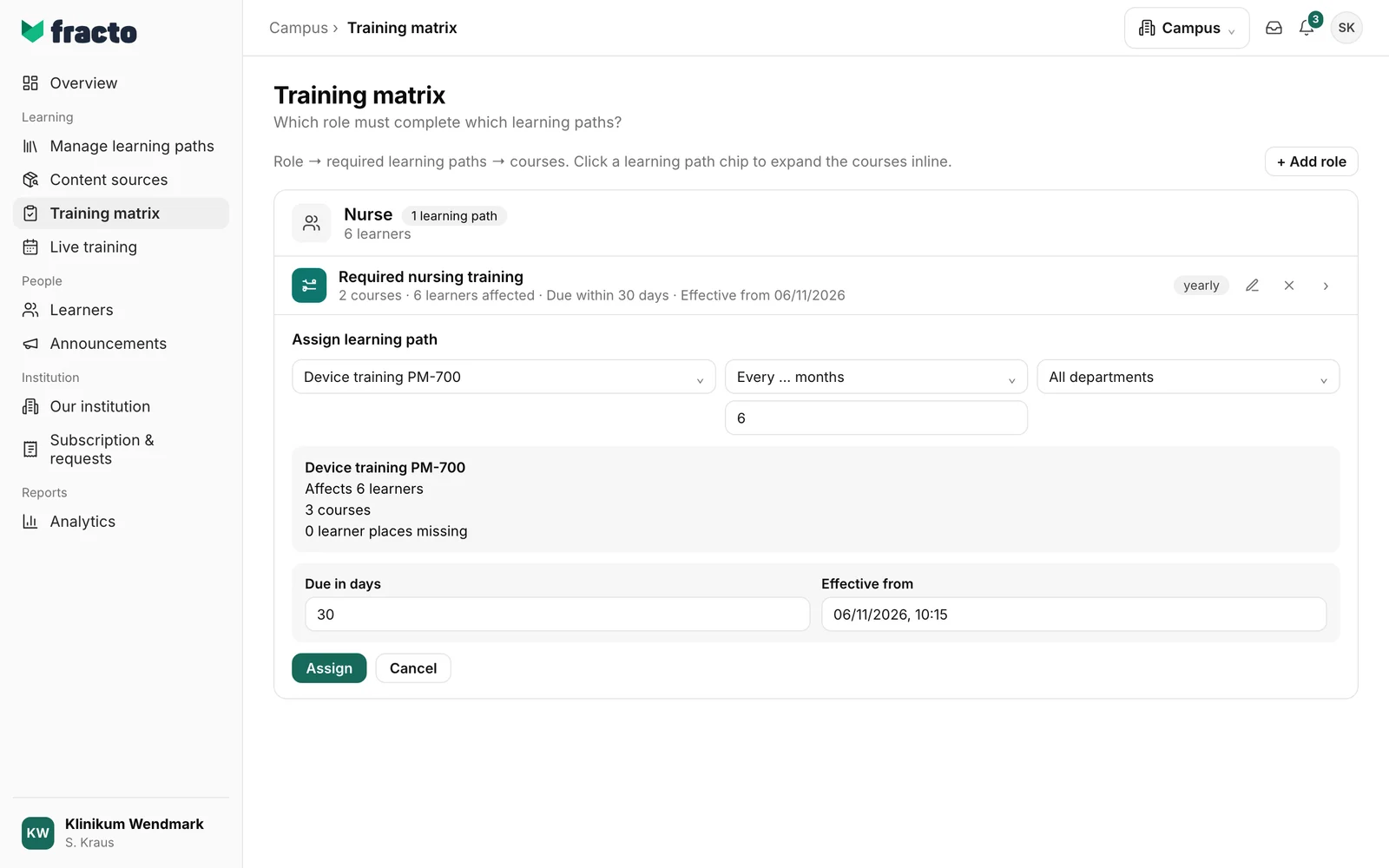
In Campus, open the Training matrix. On the role card, click Assign learning path and choose the learning path.
-
In the second field, choose the cadence, that is how often the obligation repeats: yearly (default), Every 2 years, quarterly or Every … months. For Every … months, enter the number of months (1 to 120) in the number field below. The field takes over the previous number, for example 12. With one-time, nothing repeats.
-
Under Due in days is the deadline for the first round, under Effective from the start. Repeats have a deadline of their own (see below).
-
Check the preview and click Assign. The button only becomes active once the preview is there and the number of months is between 1 and 120.
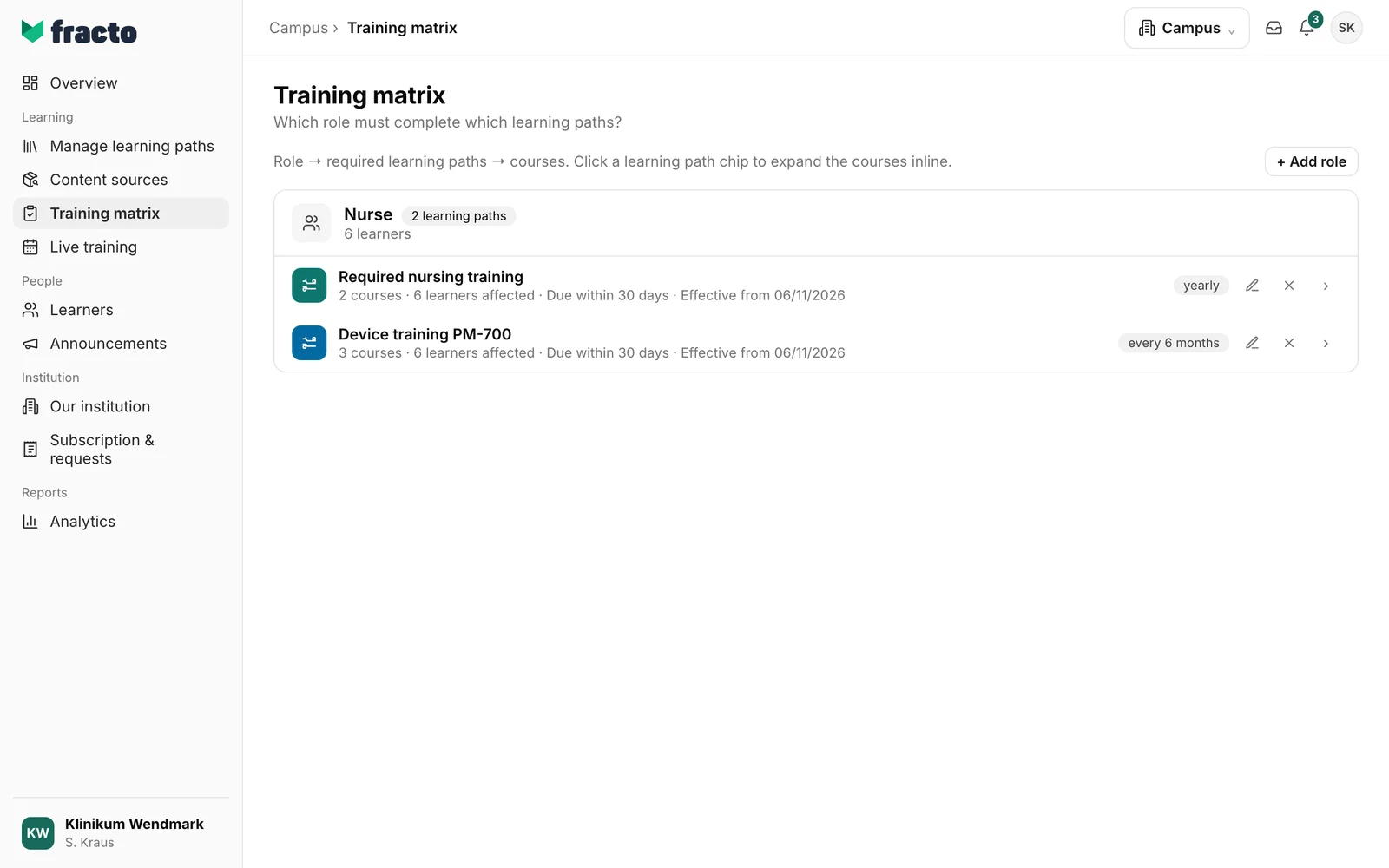
You can tell it worked when a new row for the learning path appears under the role. On the row, a label shows the cadence, for example “every 6 months”.
How Fracto calculates the repeat
- First round. The deadline is the start of the obligation plus the days under Due in days. If the person completed the course before the start and the credential is still valid, the obligation is not reopened at once. The first repeat then counts from the start of the obligation.
- Next round. When the person has completed the round, Fracto calculates: completion date plus cadence. For months, if the day does not exist in the target month, Fracto takes the last day of that month (31 August plus 6 months gives 28 February). If a course issues a credential with an expiry date and it expires earlier, that earlier date applies.
- From the due date. On that day the obligation is open again, and it is due that day. Repeats have no extra deadline in days. The person can only fulfil the new round with a completion after the last fulfilment. An old credential does not count.
- Completed rounds stay. They remain as history. In the person record, a fulfilled obligation shows “Fulfilled on …” and the “next due …”.
- Reconciliation. Fracto reconciles the training matrix every hour; rules with a later Effective from take effect from that time.
- Several rules for the same course. If a course appears in several learning paths of a person, there is only one obligation. The earliest deadline applies. With the same deadline, the recurring rule wins over the one-time one, then the shorter cadence.
Reminders
The person gets a reminder in the Player and, with an address, by email in their language, “Training deadline approaching”, as soon as the due day of an open obligation is at most seven days away, and “Training deadline exceeded” when the deadline has passed. For repeats there is no advance warning: the new round only opens on the due date and is due the same day. The first reminder comes on that day, the second afterwards as “exceeded”. Each person can switch these reminders off in their preferences. Your institution cannot change that for everyone.
Change or end the rule
- With the pencil Edit assignment, you change cadence, department, deadline and start and save with Save changes. Fracto recalculates the obligations of the affected people at once. You cannot swap the learning path itself.
- With the cross Remove assignment, you take the obligation back. The dialog first says how many learners lose the obligation. Confirm with Remove.
If it does not work
| Message | What it means |
|---|---|
| The entries are incomplete or invalid. | Check the cadence (months 1 to 120) and the deadline (days 0 to 3,650). |
| The rule could not be created. | The rule was not saved. Try again. |
| The rule could not be saved. Please reload if it was changed in the meantime. | The change to an existing rule was not saved. Reload the page. |
| No preview available | The impact could not be calculated. Choose the learning path again. |
| You do not have permission for this change. | Only Campus managers can change the training matrix. |
Checked on 6 November 2026 against the current Fracto release.
