
Submit a course for review
How to submit a course for review in Studio: choose one reviewer, add notes and a due date, and hand the saved course version over for approval.
If a course requires approval, one person reviews it before you can publish it. You submit the saved course version. The reviewer sees exactly that version and decides for the whole course.
Before you start
- The course requires approval. You set this in the Course settings, section Sharing, under Approval before publishing: switch Require approval by a reviewer. The switch is off by default. A copy keeps the setting of the original. Once approval is required, only someone with the “Administer workspace” task in the workspace can remove it. The switch can still be operated by authors, and saving then fails with the message below.
- You work in Studio as an author and may request reviews. Without that right, the Submit for review button is missing.
- The workspace has at least one other person with the review task. In the Hub’s permission management it is called Review courses. You cannot choose yourself.
- Studio review and publication exist for manufacturers and for institutions with Campus Full, not for sponsored institutions.
- At least one lesson is visible.
- If the course has a final assessment, it is complete: it has at least one active question, and the number of questions drawn fits the question pool.
- No other review is running for the course. Only one is open at a time.
How to submit a course
- Open the course in Studio.
- Click Submit for review at the top. The Review request dialog opens and loads the list of reviewers. Refresh reloads the list.
- Under Reviewer, choose exactly one person. None is preselected. Submit review stays disabled until you have chosen one. You cannot choose several people.
- If you like, write a Message to the reviewer (up to 4,000 characters) and pick a Due date. Both are optional, and the date field is empty.
- Click Submit review. Only now does Fracto save open changes and freeze the saved version.
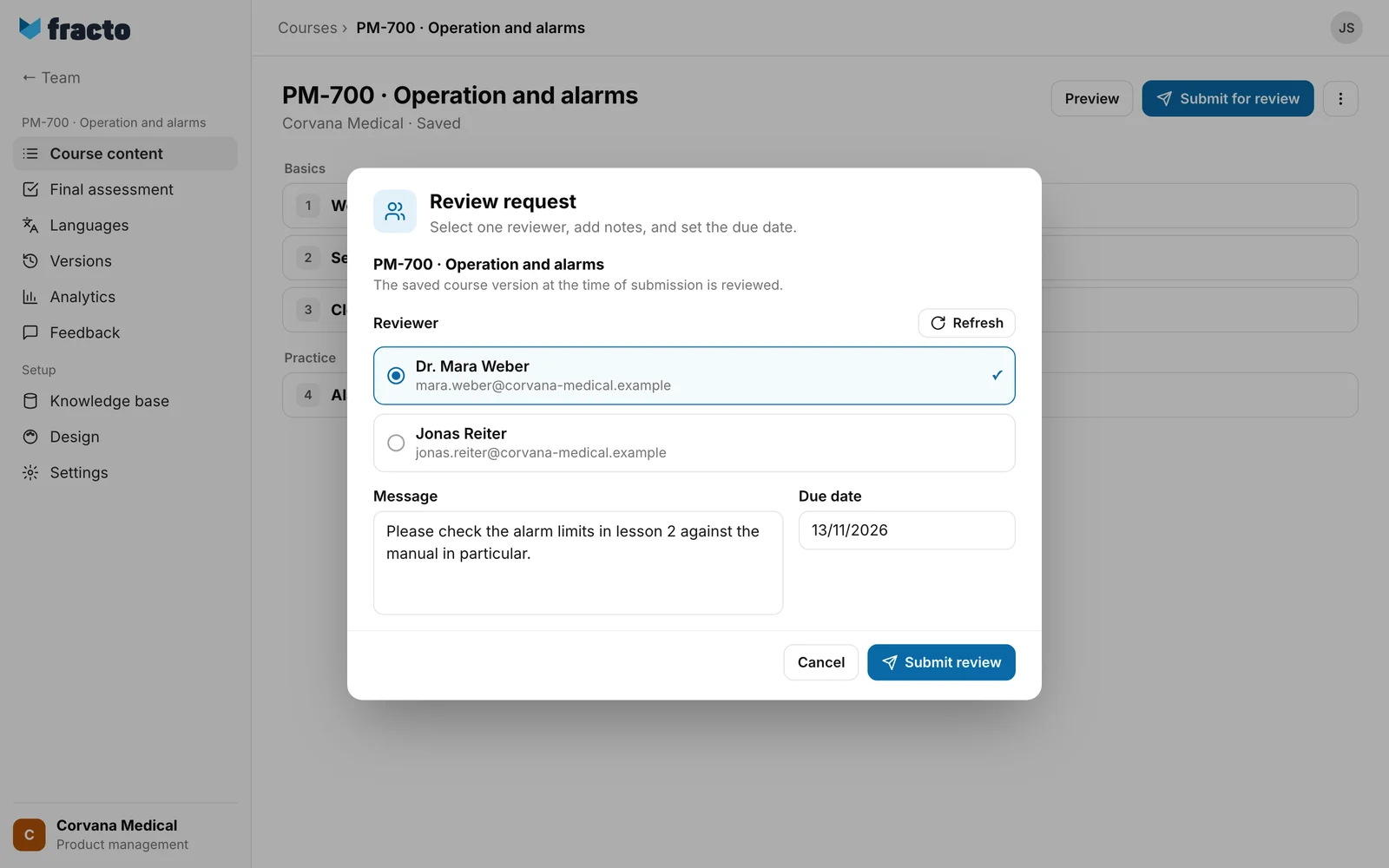
If the dialog says “No active reviewers found.”, that is a hint, not an error message: no other person in the workspace has the review task yet.
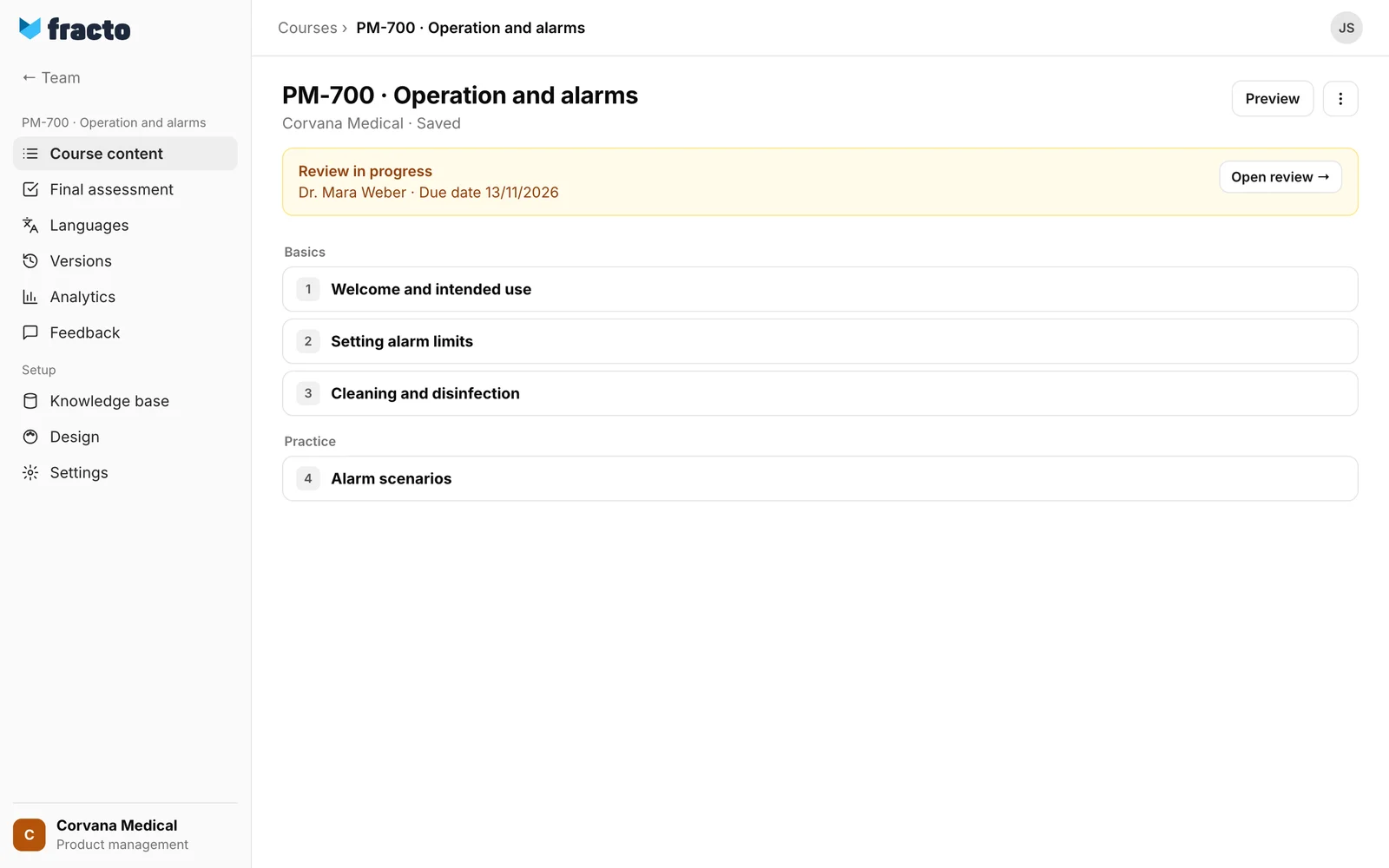
You know it worked when the course page shows Review in progress with the reviewer’s name and the due date. Open review shows you the submitted version. Submit for review is gone while the review runs.
What happens next
- Fracto freezes the saved course version: course content, final assessment and knowledge base. The reviewer sees that version even if you keep working. Your later changes in the draft belong to the next review.
- The reviewer gets a notice in Fracto and an email “New review request:
” with the button Open review. Both go only to people who may work in the workspace at that moment, and only if the person has not switched these notices off. The email also goes only if an address exists. The workspace can switch the email off in the Hub or reword it, so the subject can differ from this example. - Your message and the due date appear in the reviewer’s Review requests list, not in the email.
- The reviewer can write review notes and then decides for the whole course: approve or request changes. There is no partial approval for single lessons.
- Once the reviewer has decided, you and the course owner get a notice and an email (“Review approved:
” or “Changes requested: ”). For requested changes, the email contains the first 240 characters of the summary. This too applies only if the person has not switched these notices off. - If the reviewer approves, the course page shows Review approved, but only for a course that is not yet published. For a new version of a published course, you recognise the approval by the menu entry Publish approved snapshot. You can now publish the approved version. See “Publish a course”.
- If the reviewer requests changes, the course page shows Changes requested with the reviewer’s summary and the button Edit review notes. Revise the course, or reply with a reason to review notes, then click Submit for review again. That is the next round of the same review. You choose a reviewer again. Choose the same person while review notes are open: a different person who only reviews does not see the notes of earlier rounds, cannot resolve them and therefore cannot approve. Open review notes from earlier rounds stay open until the reviewer resolves them. Fracto does not accept a resubmission without a change and without a reply. Only a reply from you, the person who submitted, to a note that is still open counts as a reply.
- The review runs until the reviewer has decided. In Studio it can be neither withdrawn nor reassigned to someone else. If the person has lost the review task, they can no longer decide, and every new submission fails with “A review request is already open for this course.” The task must then be assigned to them again in the workspace.
- The due date is only information for the reviewer. A date in the past is allowed, and Fracto sends no reminder.
If it does not work
| Message | What it means |
|---|---|
| A review request is already open for this course. | A review is already running. Wait for the decision. |
| One or more reviewers are not active reviewers in this workspace. | The chosen person no longer has the review task. Click Refresh and choose again. |
| Reviewers could not be loaded (HTTP 500). | The list could not be loaded. Click Refresh. The number is the server’s code. |
| The course changed in the meantime. Reload the latest state before saving again. | Someone changed the course in the meantime. Reload the page and submit again. |
| Show at least one lesson before you publish the course or submit it for review. | All lessons are hidden. Show at least one. |
| The final assessment has no active question yet. | Activate or add at least one question under Final assessment. |
| The final assessment is not ready for publication yet. The number of assessment questions used does not match the question pool. Correct it under “Final assessment” → “Settings”. | The number of questions drawn does not fit the pool. Instead of the second sentence, the message can also name the number of available questions. |
| The final assessment is not ready for publication yet. Please complete it in the “Final assessment” area. | The assessment has another gap. Open it and complete it. |
| Before resubmitting, change the course or provide a reasoned reply to a review note. | You are resubmitting an unchanged version after “Changes requested”. Change the course or reply to a review note. |
| Snapshot data too large. | The frozen course version exceeds the limit of about 10 million characters. Make the course smaller, for example with less text per lesson. |
| The review request in progress could not be loaded. | Fracto could not read the review status. The Submit for review button is missing then. Reload the page. |
| Required review can only be turned off with the “Administer workspace” task. | You switched off Require approval by a reviewer, but you lack the task. Saving the course settings fails. Switch it on again or ask a person with the task. |
| Review could not be submitted (HTTP 500). | The server refused the submission without a more specific message. Try again. The number is the server’s code. |
If the Submit for review button is missing, the course does not require approval, a review is already running, or you lack the right. If the course does not require approval, publish it directly.
Checked on 6 November 2026 against the current Fracto release.
