
Reset a learner's course
How to reset a started or finished course for one person in Campus, and what happens to the attempt and the certificate afterwards.
Someone needs to take a course again, for example because their device has new software. After a reset, they start again at 0%. The old attempt and the old certificate are kept, but they no longer count.
Before you start
- You need permission to assign courses directly in Campus, for the whole organisation, not just for one department.
- Only a course that is Started or Finished can be reset. A course that is only Booked has no button.
- If the Reset button is missing for a started or finished course, you do not have the permission.
- A reset cannot be undone.
Reset a course
-
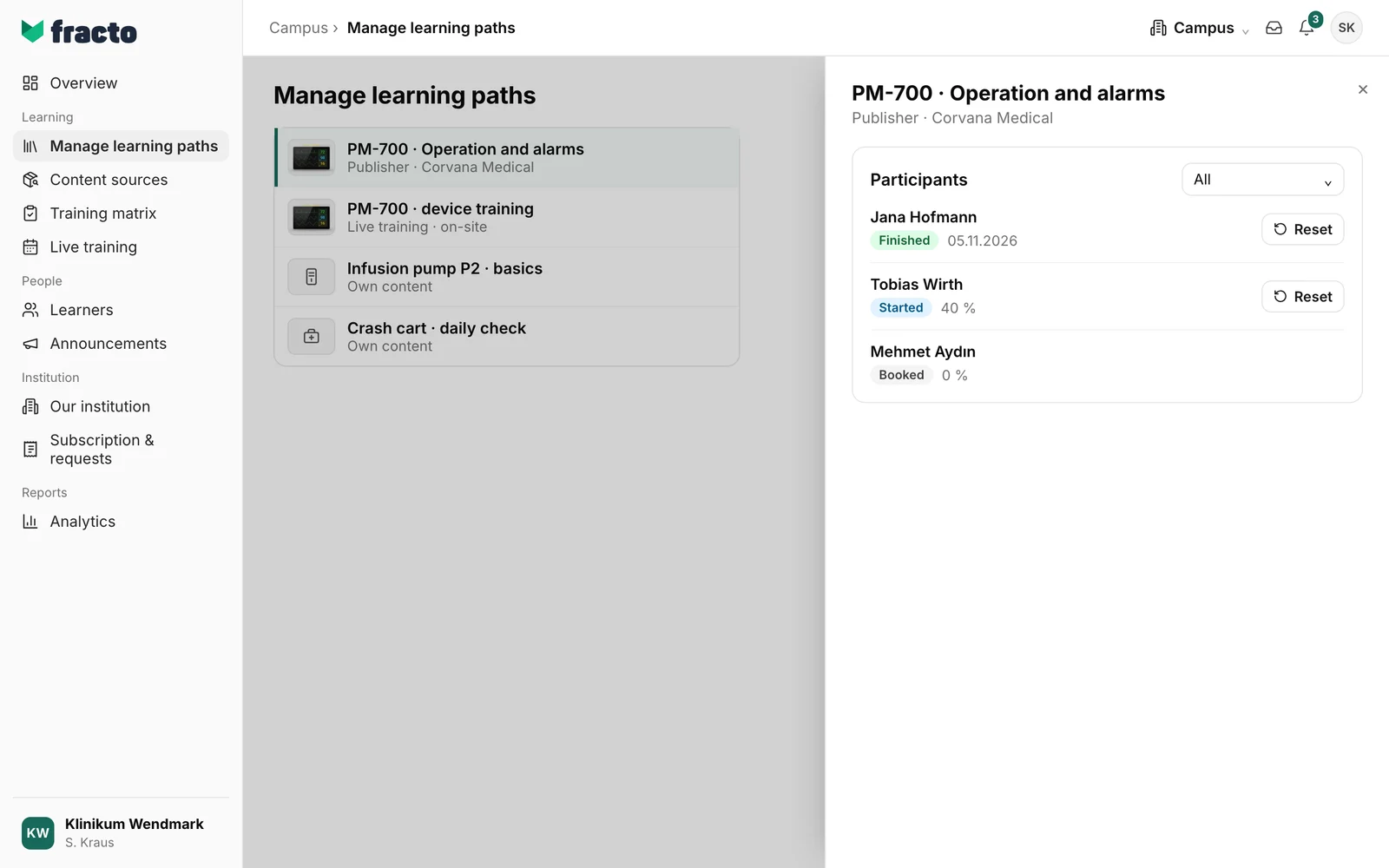
In Campus, open Manage learning paths and open the course from the Courses list.
-
Participants lists everyone in your organisation who has this course, with their status. Use the selector next to it (set to All by default) to filter by status.
-
Click Reset next to the person.
-
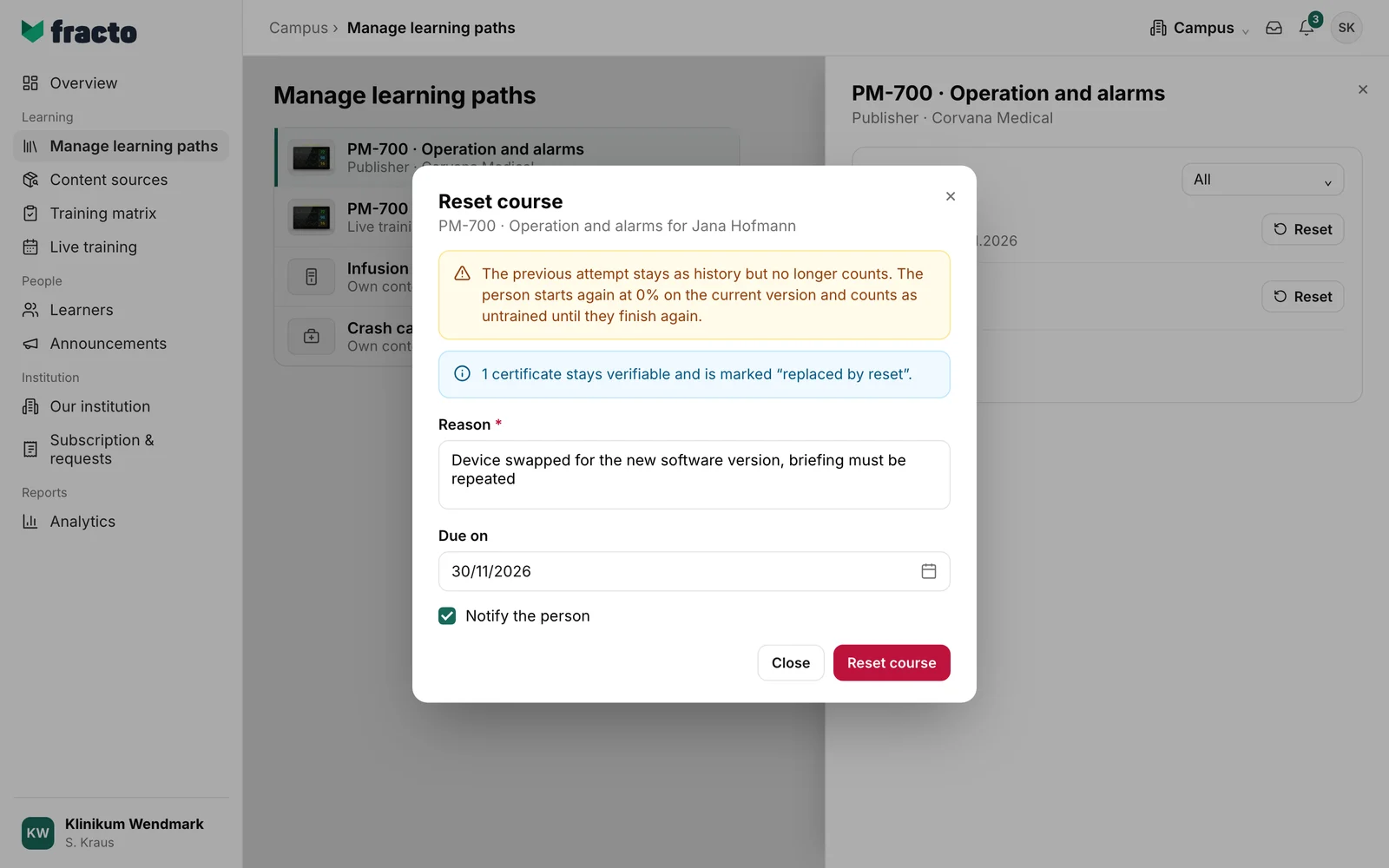
The Reset course dialog shows what the reset does. Enter a Reason. It is required and later appears in the person’s History.
-
Under Due on, set the date by which the person should finish the course again. If the course belongs to an obligation with a due date, that date is already filled in. If it has passed, the field stays empty and you must choose a new date. If you enter a date and there was no obligation, this creates one with that date.
-
Notify the person is ticked. The person then gets the message “Course reset” in the Player, asking them to complete the course again. Whether they also get an email depends on your organisation’s and the person’s settings. Untick it if you do not want that.
-
Click Reset course.
How you can tell it worked: the list (set to All) shows Booked for the person, with New after reset, and the button is gone.
You find the same button in two more places:
- in Learners: open the person, then the Courses tab. Use this when you start from a person.
- in Content sources: choose the source, open the course, then Participants. Use this when you start from where a course comes from.
What happens next
- The person starts again at 0%, on the version of the course your organisation currently has. They get all their exam attempts back.
- Until they finish again, they count as untrained. If they had an obligation for this course, it is open again, with the date from Due on. If the field is empty, it gets no new date.
- An exam the person is taking at that moment is cancelled. Their answers in it are lost.
- The person’s History shows the reset with its reason. The previous attempt is kept but no longer counts.
- The old certificate stays verifiable but is no longer valid. The person sees it in the Player under Credentials, marked Replaced by reset. A new certificate is issued only after they finish again.
- Some records belong to no organisation, for example imported ones. If you reset such a course, the record no longer counts for any organisation. The dialog warns you first.
If it does not work
| Message | What it means |
|---|---|
| The previous due date (…) has passed. Choose a new date. | This note appears under Due on. Choose a new date, or the course cannot be reset. |
| The date is in the past. | The date you chose is before today. Choose a later one. |
| The course has changed in the meantime. Close the dialog and check the current state. | While the dialog was open, the course was already reset or a new attempt was started. Close the dialog and check the list. |
| No version of this course is available. Nothing was changed. | There is no version the person could start again on, for example because the course is no longer offered to you. |
| The course could not be reset. Nothing was changed. | A general error. Try again. |
| The details could not be loaded. | The dialog could not load the person’s status. Close it and open it again. |
Checked on 6 November 2026 against the current Fracto release.
