
The person record
What Campus shows for each person in the learner list: profile, obligations, courses, accesses, credentials, messages, history, and what you can change.
For each person in your institution, Campus has a page with everything that belongs to them. The app opens it as a panel next to the list. Here it is called the person record. It shows what the person has to learn, what they have already done and what has happened to them in your institution.
Open the person record
In Campus, open Learners. On the People tab, click a person. The record opens. It always shows the person within your institution only. The same person can have further memberships in other institutions. You do not see those here.
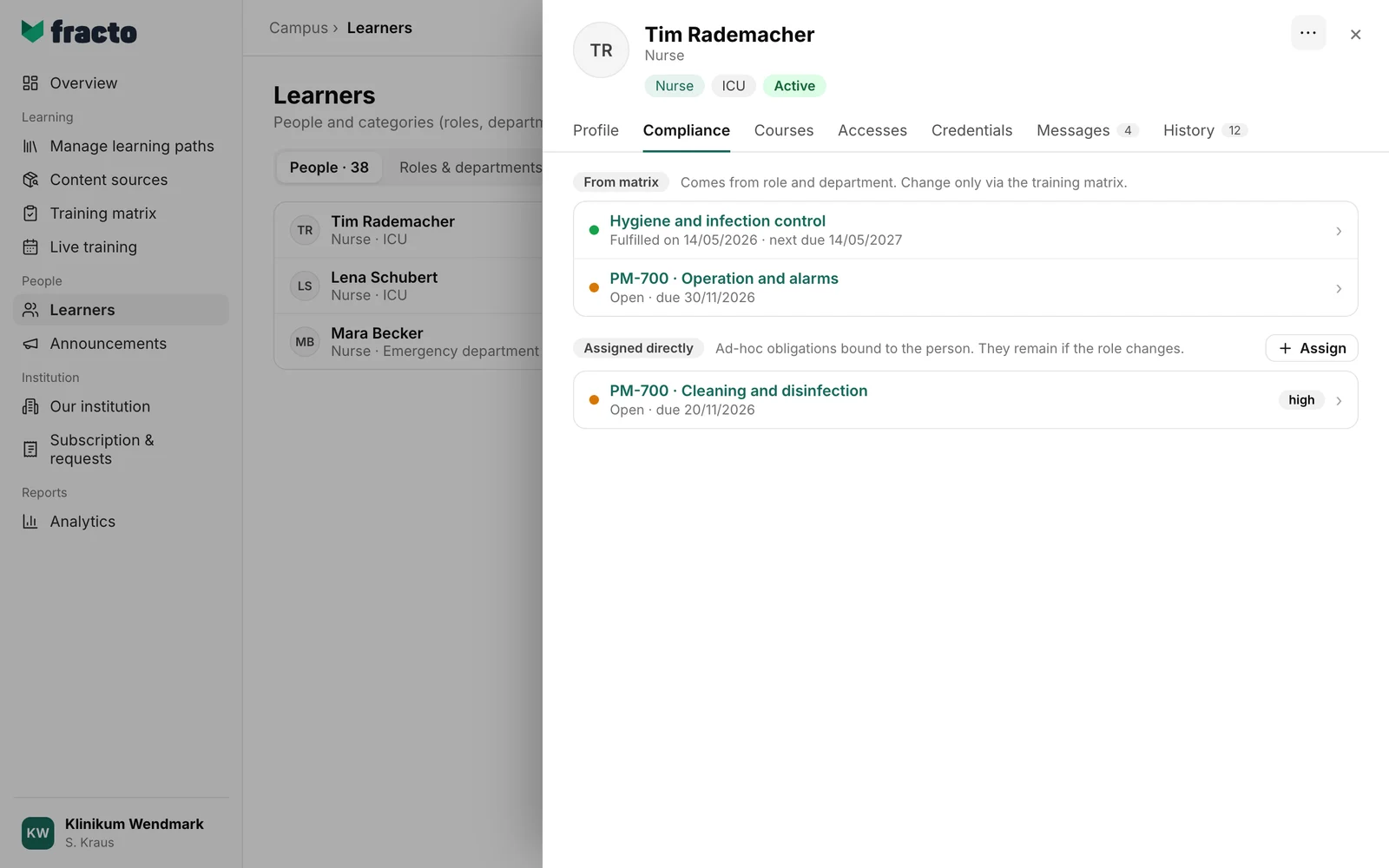
At the top are the name, the position and labels: the roles, the department, the employment and the status (Active or Inactive). Below, you choose one of seven tabs.
What the tabs show
Profile. A Compliance tile shows how many obligations are fulfilled (“3 of 4 fulfilled”) and the share in percent. Cancelled obligations do not count. Without obligations it says “Not applicable”. Below are Contact with the email address and Organization membership with Company / employer, Joined, Language, Position, Employment and Person ID; company, language, position and employment appear only if entered. If a course of the person prints the job title on the certificate and none is entered, the top says: “A course of this person prints the job title on the certificate, but none is entered here. Depending on the profile, the line is left out or the certificate waits until you enter it.” In the people list, the person then carries the label “Job title missing”.
Compliance. The person’s obligations are in three groups. From matrix: obligations that result from role and department; you change them only in the training matrix. Assigned directly: courses you assigned to the person individually; they stay when the role changes, and Assign adds more. Voluntary: courses the person chose themselves; this group appears only if there are any. Each row gives the status: “Fulfilled on …” with the next due date if the obligation recurs, or Open, Waiting for learner place or Partially fulfilled with “due …”. Rows with high or urgent priority carry the label “high” or “urgent”. Clicking a direct assignment opens the Assignment details; a matrix obligation leads to Manage learning paths.
Courses. The courses the person has, with their status: Booked, Started or Finished. For started and finished courses there is Reset if you have the task Manage Campus. See “Reset a learner’s course”.
Accesses. How the person got to their courses. Each course shows its origin: Directly assigned, Required by the training matrix or Unlocked with the learner place, plus Active or Waitlist and the period (“valid …”, “(indefinite)”). If the person has no access, it says “No active accesses.”
Credentials. The person’s assessment results and credentials with completion date and validity (“valid until …” or “indefinite”). Without any, it says “No credentials yet.”
Messages. The messages the person received from your institution, with title, date and, if known, the sender. Only the newest 25 are loaded; the number on the tab can be larger. You see the content of messages from other managers only if your institution allows it; otherwise Masked appears next to them.
History. What has happened to the person in your institution, 25 entries per page. Each row has a category (for example Learning, Organization membership, Obligation or Access). A click opens the row: who triggered it (Manager, Learner or System), the details and, if present, the reason and the value before and after. On the Messages and History tabs, a number shows how many entries there are.
What you can change in the record
With the task Manage Campus (Campus manager) you have the More actions menu at the top right. The profile has the same buttons, with one exception: View as learner (read-only) exists only in the menu.
- Edit participant details changes first name, last name, Company / employer, Position, Joined, Employment and Language; the last five apply to this institution. Fracto proposes a changed name to the person in their Player account for confirmation; until then the old name stays (“Proposed name: …”).
- Change role / department and Send message act on this one person.
- End Campus access ends only the access to this institution. The Fracto account, credentials and other authorised Campus access stay. Occupied learner places remain reserved until the end of the booking period. For your own person, this button, the privacy request and View as learner (read-only) do not exist.
- Start privacy request files a request for review. Nothing is deleted and no access ends yet; only after approval are accesses blocked and direct identifiers pseudonymised. The status (“Review pending”, “Pseudonymization completed”, “Request rejected”) then appears in the profile. While a request is “Review pending” or already completed, the button is missing.
- View as learner (read-only) opens the Player the way the person sees it. The view ends after 15 minutes or with “End ghost mode” in the Player. Progress, answers and assessments are not saved, and personal inboxes stay hidden. The request appears in the person’s history. For memberships that are not active, the entry does not exist.
With Manage department you see the record, but no menu and no buttons to change anything; Assign is disabled.
If it does not work
| Message | What it means |
|---|---|
| Person could not be loaded. | The record could not be loaded. Close it and open it again. |
| Messages could not be loaded. | The Messages tab could not be loaded. |
| History could not be loaded. | The History tab could not be loaded. |
| The courses could not be loaded. | The Courses tab could not be loaded. |
| The participant details could not be saved. | The change to the profile was not saved. |
| These details have changed. Close this dialog and reload the details. | Someone else changed the profile while you were editing it. |
Checked on 6 November 2026 against the current Fracto release.
