
Create a learning path
How to create a learning path in Campus, add courses to it and put the courses in the order you want.
A learning path bundles courses on one topic, for example everything new nurses should learn about a device. A learning path does not assign anything to anyone yet. It becomes an obligation only when you assign it to a role in the training matrix.
Before you start
- In Campus you are a Campus manager. Department leads can only view learning paths.
- The courses you add come from your content sources. They are in the Courses list.
Create a learning path
-
In Campus, open Manage learning paths. On wide screens, the Courses list is on the left and the Learning paths list on the right. On narrow screens you switch between Courses and Learning paths.
-
In the Learning paths list, click New learning path.
-
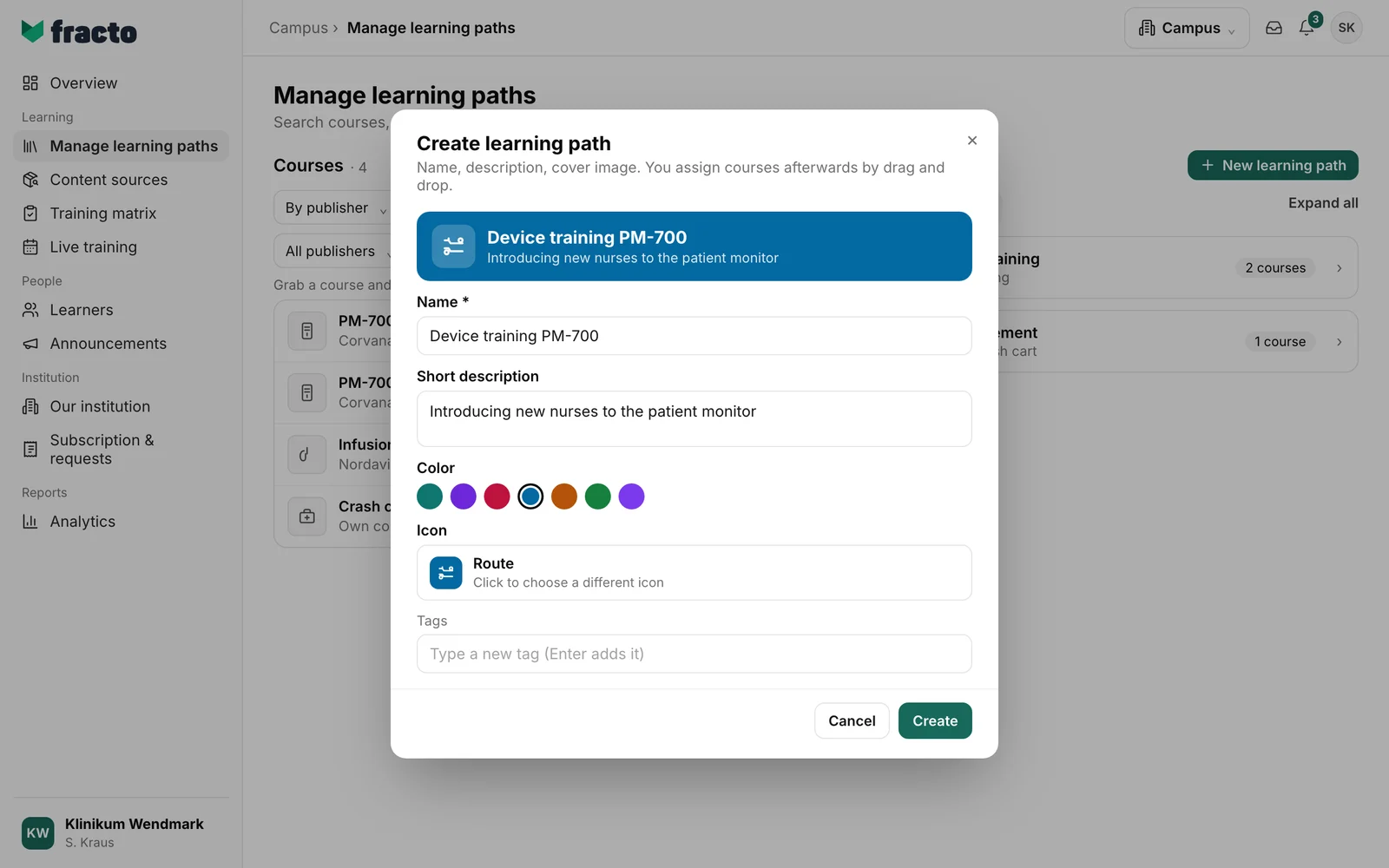
In the Create learning path dialog, enter the name. It is required. Under Short description, say what the path is about. Color and Icon decide how the learning path looks in the lists. You see both in the preview at the top. Under Tags you can add keywords: type a tag and press Enter, or click an existing tag.
-
Click Create. The new learning path is in the Learning paths list, collapsed and still without courses.
-
Click the learning path to open it. Click Add course. A panel opens on the right. Search for the course and click Add next to it. If the course is already in the learning path, it says “Included” there. The panel then closes. For the next course, click Add course again. On a computer you can also drag a course from the Courses list onto the learning path.
-
Put the courses in the right order. Move a course with the arrows or drag it to another place. The cross takes a course out again.
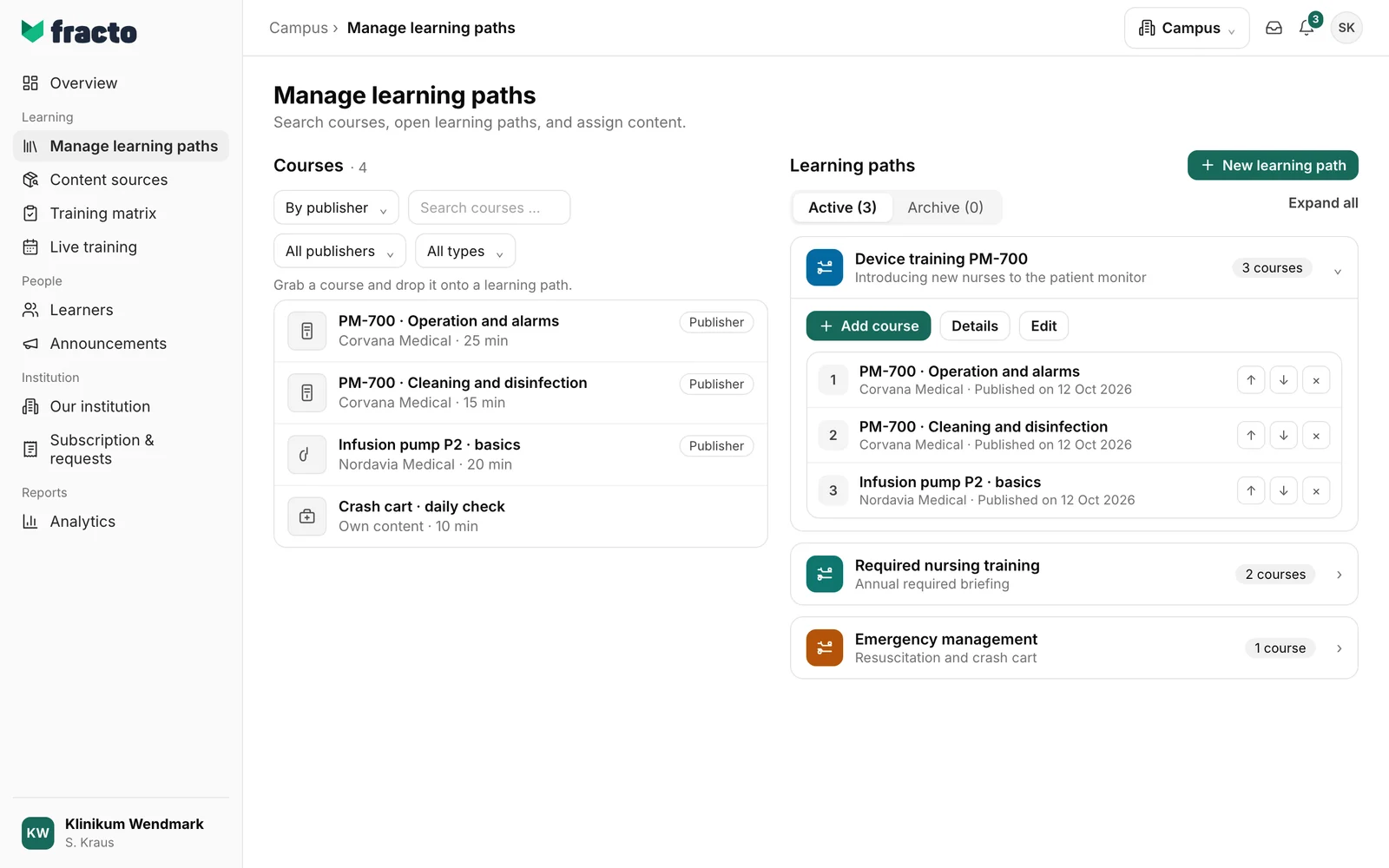
How you can tell it worked: the card shows the number of courses, for example “3 courses”, and the courses are numbered in order.
What happens next
- A new learning path is not assigned to anyone. Details shows in which rules of the training matrix it is used. As long as it is in no rule, it says “This learning path is not currently used in any matrix rule.”
- Every change to the courses saves a new revision. Details shows the revision and when it is valid from.
- You can assign a learning path to a role in the training matrix. A live training and an announcement can also link to a learning path.
- You change name, description, colour, icon and tags with Edit. That is also where Archive is: “The learning path leaves the active list. You can restore it from the archive.” An archived learning path can no longer be newly assigned in the training matrix. You find archived learning paths under the Archive switch (with the number in brackets): open the card and click Restore, and the learning path is active again. Revisions, matrix obligations and history are kept. Anyone who is allowed to also sees Delete permanently on archived learning paths.
If it does not work
| Message | What it means |
|---|---|
| “…” is already in the path. | You dragged a course from the Courses list that is already in the learning path. A course can appear only once. In the panel, such courses say “Included”. |
| The course cannot be assigned to this path. Its content source may not be enabled yet. | This message only appears when you create, edit, archive or restore a learning path. Check your entries, for example the name, and try again. |
| The path was changed in parallel. Please reload. | Someone else changed the learning path at the same time. Reload the page and make your change again. |
| No permission. A manager role is required. | Only Campus managers change learning paths. |
| The path could not be updated. | When adding, moving or removing a course, the change was not saved. Try again. |
| Action failed. | A general error when creating, editing, archiving or restoring. Try again. |
| Order cannot be changed because historical content is no longer available. | The learning path has a course that is no longer available. While it is in the path, the order cannot be changed. |
| Learning paths could not be loaded. | The page could not load the learning paths. Reload it. |
Checked on 6 November 2026 against the current Fracto release.
