
Decide on requests for more learner places
How to decide a request for more learner places in Channel: approve it in full or in part, reject it or forward it, and what applies afterwards.
When an area below you needs more learner places, it asks for them. The request lands at the next level above where someone may allocate. You approve in full or in part, reject, or pass the request up. Only an approval changes the quota. The request itself does not reserve a learner place. Requests can also come from Campus, from an institution’s Campus lead; the decision then goes back to the institution’s Campus.
Before you start
- You may allocate on the area the request is addressed to: you are the network lead (Hub task “Lead network”) or appointed in Channel as region or team lead of that area. If an institution’s Campus lead makes a request and a partner supports that institution, that partner’s partner lead decides. Anyone who may only read sees the request but no fields to decide it. Fracto never routes a request to the person who made it. If nobody else is on a level, it goes up one level.
- A request goes to the next level above the requester where someone may allocate learner places. Levels without such a person are skipped.
- A request for the pool of the whole workspace is not decided in Channel but in the Hub.
How you hear about a request
Everyone who may decide at the time of the request receives the in-app notification “New request to decide”. It can be switched off in personal preferences. There is no email. The notification leads to the Inbox. Whoever may ask uses the Request quota button on the Manage learner places page.
Decide a request
-
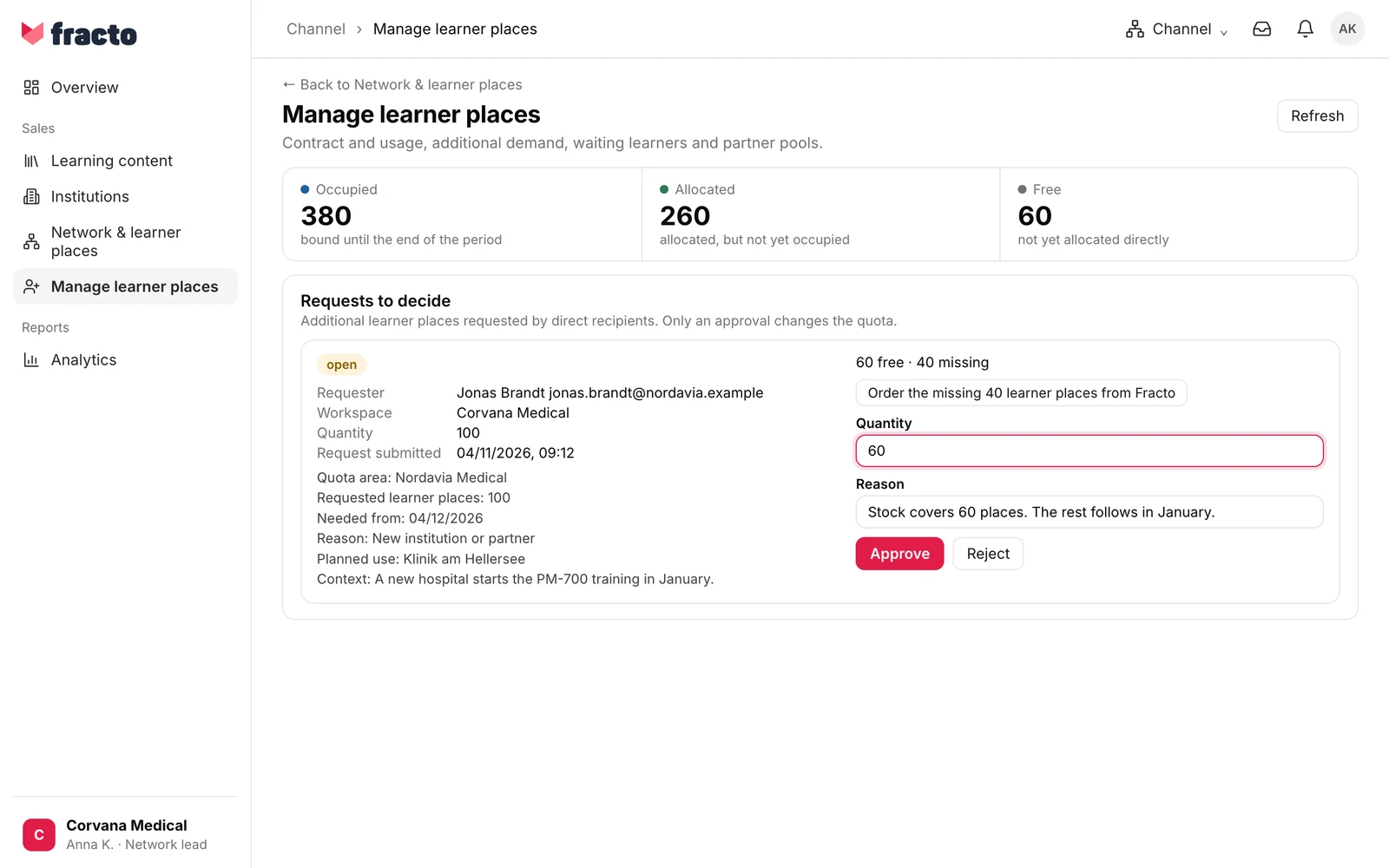
In Channel, open Manage learner places. If direct recipients have open requests, the card Requests to decide is there. Alternatively, in the Inbox open the Requests view, switch to To decide and click the request.
-
Read the request. It names the requester, the workspace and the Quantity. Below it is what the requester entered: quota area, requested learner places, needed from, reason, planned use and context. The line “… free · … missing” shows how many your area can give right away and how many are missing.
-
If you want to approve less than requested, lower the Quantity. It is preset to the requested amount. A whole number from 1 up to the requested amount is allowed. You can approve at most as many learner places as are free in your area.
-
If needed, enter a Reason. For an approval it is optional. To reject, it is required: at least two characters, at most 2,000. Until it is filled in, Reject is disabled.
-
Click Approve or Reject. An approval below the requested amount counts as “partially approved”.
You know it worked when “approved” (also for a partial approval) or “rejected” and the message “The decision was saved.” appear. The request disappears from the card.
If learner places are missing
The line “… free · … missing” appears on every open request, even with “0 missing”. If learner places are missing, you have two options, as far as they are offered:
- Forward to the next level. The request goes to the next level where someone may allocate learner places. The deciders there receive the notification “New request to decide”, and the requester receives “Quota request forwarded”. If the higher level approves, the quota of every level in between grows by the same amount. The button only exists if there is such a level.
- “Order the missing … learner places from Fracto”. This exists only at the top level of the workspace, when there is no further level. The button creates a capacity request for the missing amount. Afterwards it says “Ordered on …” with the status of the capacity request. There are no more learner places until they are available in the Hub.
You can also redistribute first, see “Allocate learner places”, and decide the request afterwards.
What happens next
-
If you approve, the recipient’s quota grows by the approved number, and the free stock in your area drops by the same number. The pool stays the same: places are only redistributed. If you reject, nothing changes in the quota.
-
A decided request cannot be decided again.
-
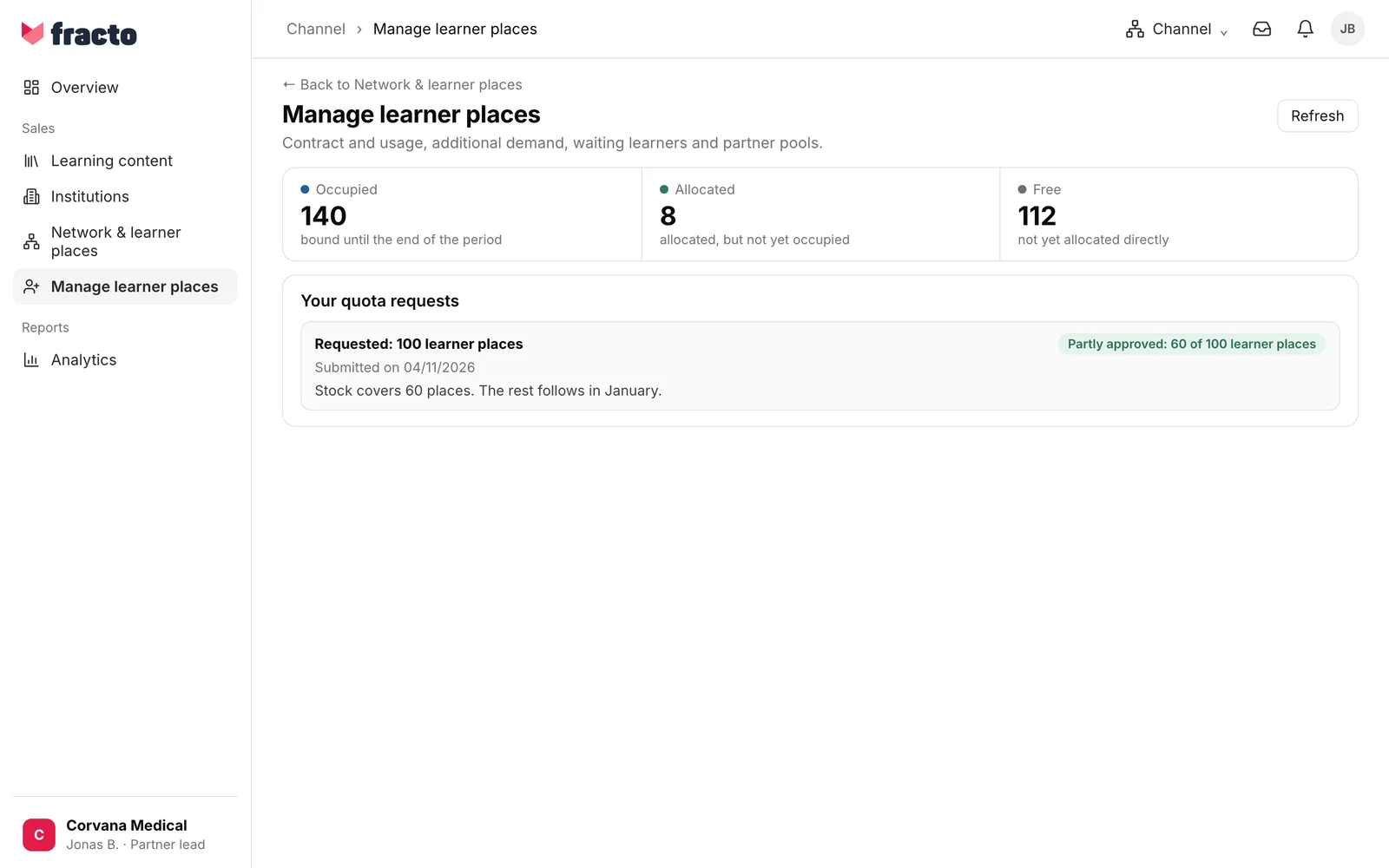
The requester receives the in-app notification “Request decided”, unless they switched it off. For an approval it says, for example, “60 of 100 learner places approved · new quota …”, for a rejection your reason. On their Manage learner places page, the decision with your reason appears under Your quota requests: “Approved: … learner places”, “Partly approved: … of … learner places” or “Rejected”.
If it does not work
| Message | What it means |
|---|---|
| The decision could not be applied. Reload the request and check its status and available places. | The decision was not saved. Possible reasons: the request has been decided or forwarded in the meantime, the quantity is above the requested amount or above your free stock, or you may no longer decide it. Reload the request and check the numbers. |
| Could not load requests. | The Inbox could not load the list. Reload the page. |
Checked on 6 November 2026 against the current Fracto release.
