
Allocate learner places
How to allocate learner places to a team, partner, region or institution in Channel, return some, and check the numbers beforehand.
You give an entry of the network more learner places, taken from the stock of the level directly above it. Nothing is purchased; places are only redistributed.
Before you start
- You need permission to allocate learner places from the source. The network lead (Hub task “Lead network”) may do so everywhere, including from the pool. A region lead appointed in Channel allocates their region’s learner places, for example to its institutions; only the network lead tops up the region itself. If your only Hub tasks are “Manage region” or “Manage team”, you may not allocate, even if Channel shows you as region or team lead. Without it, the Manage learner places buttons are missing on the entries. If Fracto rejects the allocation when saving, it says “You are not permitted to make this allocation.”
- It is easiest if the level above the recipient has free learner places that can be allocated directly. That is the source: teams and partner groups receive their learner places from the Manufacturer Campus, institutions from their region, and the Manufacturer Campus and regions from the pool. In the panel the pool is called “Central manufacturer reserve”. If the source has none, see “If the source is empty”. What Occupied, Allocated and Free mean is explained in “Learner places and quotas”.
Allocate learner places
-
In Channel, open Network & learner places.
-
At the recipient, click Manage learner places. It is available on teams, partner groups, regions, on the Manufacturer Campus and on institutions, except partner-funded ones. For the Campus and regions you can alternatively use the Free card and click Allocate learner places there. The button is inactive while the pool has no free learner places. Then choose the Campus or a region under Recipient.
-
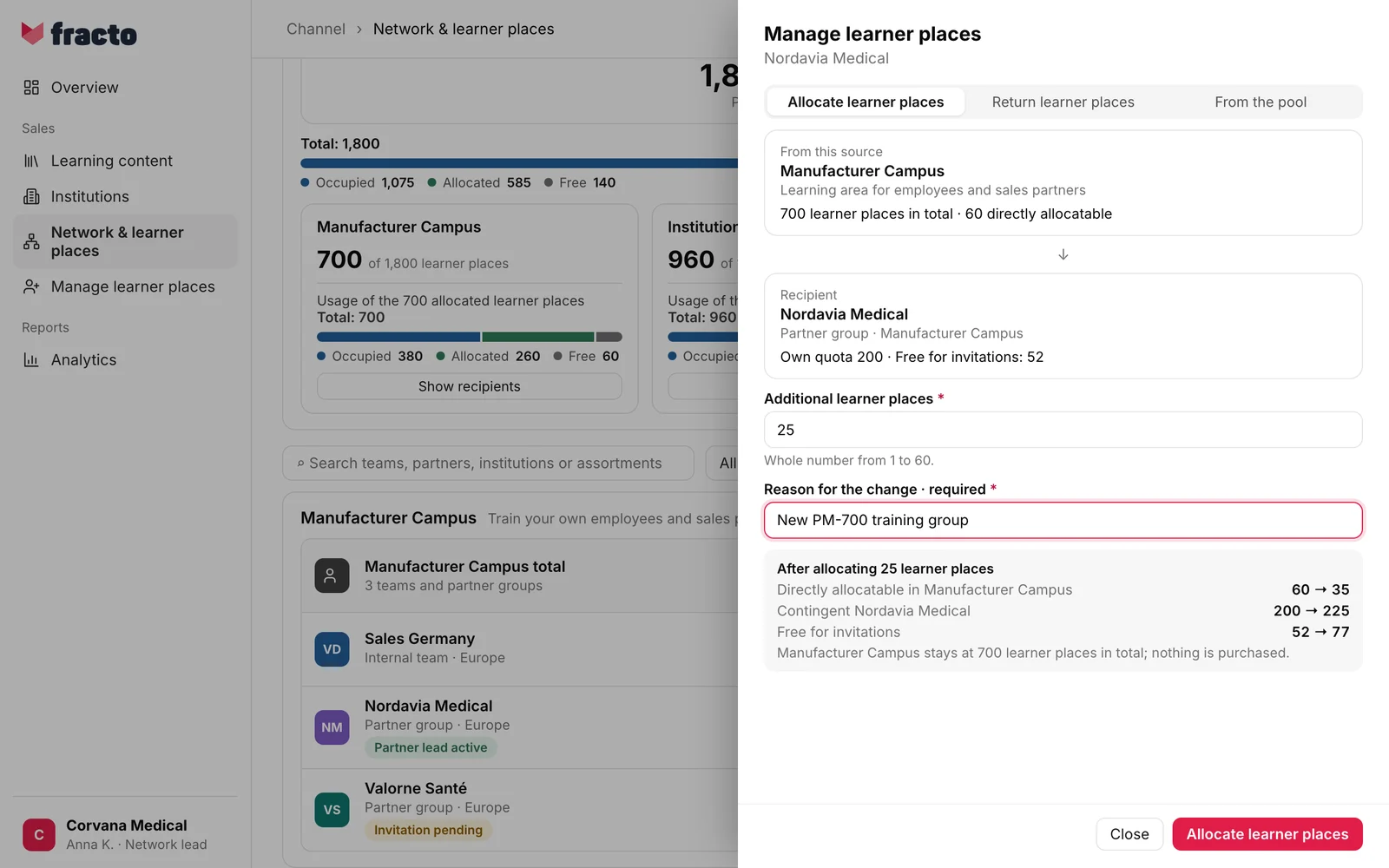
The Manage learner places panel opens on the Allocate learner places tab. At the top it says where the learner places come from (“From this source”, with “… learner places in total · … directly allocatable”), below it the recipient with “Own quota … · Free …”. For teams, partner groups and institutions the last word is “Free for invitations”, for the Campus and regions it is “Free”.
-
Enter the number under Additional learner places. The field is empty to begin with. A whole number from 1 up to the number of directly allocatable learner places of the source is allowed.
-
Enter a reason under Reason for the change · required, at least three and at most 500 characters. It is saved with the change.
-
Check the preview “After allocating … learner places”. It shows before and after how many learner places in the source are still directly allocatable, how high the recipient’s quota is and how many of it are free.
-
Click Allocate learner places.
You know it worked when the panel closes and “25 learner places allocated to Nordavia Medical.” appears at the bottom (with your number and the name). The page shows the new numbers.
Return learner places or take them directly from the pool
- Return learner places. On the Return learner places tab you give learner places back to the source. You can only return learner places that are free, that is, bound by nobody. If there are none, it says “There are no unbound learner places here that can be returned.” After saving, “… learner places returned from …” appears.
- From the pool. The From the pool tab appears only if your access allows it and the source is not itself the pool. It books learner places directly from the pool to a recipient further down. Every level in between grows by the same amount; the preview shows each one.
If the source is empty
If the source has no directly allocatable learner places, it says “… has no directly allocatable learner places.” and there is no button to allocate. Instead the panel offers, as far as you are allowed:
- topping up the source from the level above (“Top up … from … (… available)”),
- reclaiming free learner places from another recipient of the source (“Reclaim free learner places from … (… free)”),
- Allocate directly from the pool,
- Request more learner places. The button leads to the Manage learner places page.
After you save a top-up or a reclaim, the panel returns to the original recipient by itself: “Then you continue with the original recipient.” Back cancels the detour without saving. If the panel offers nothing, it says “You cannot obtain more learner places for this source here. Contact the responsible person one level up.”
What happens next
- The total of the source does not change; the panel says so beforehand: “… stays at … learner places in total; nothing is purchased.” Only the distribution changes.
- The recipient has more free learner places for invitations or can pass them on itself.
If it does not work
| Message | What it means |
|---|---|
| The current numbers could not be loaded. | The panel could not load the numbers. Close it and open it again. |
| The reason is saved with the change and shown in the history. At least three characters. | This is the note under the Reason for the change · required field. Enter a reason of at least three characters. |
| … learner places are already free at recipients of this source. They are not redistributed here. | The source has no directly allocatable learner places, but free ones lie with its recipients. Reclaim them there. |
| Whole number from 1 to … | This is a hint under the field and becomes an error message if the number does not fit. Enter a whole number in this range. |
| The numbers have changed in the meantime. Check the current preview and confirm again. | Someone distributed learner places in the meantime. The numbers are updated. Check the preview and click again. |
| The change no longer fits the current learner places. The numbers are now updated. | The amount no longer works with the new state. Choose a fitting amount. |
| No learner places left to allocate from this pool. Request additional learner places. | No free learner places are left. If you are allowed to, Request more learner places appears. |
| These learner places can’t be allocated to this institution: its delivery isn’t active, or its learner places come from another pool (for example a partner’s). Check the institution’s status and supervision. | The institution does not get its learner places from this source. |
| You are not permitted to make this allocation. | You lack the permission for this recipient. |
| The learner places could not be changed. Please try again. | General error. Try again. |
Checked on 6 November 2026 against the current Fracto release.
