
Make the final assessment optional
How to make a course's final assessment optional in Studio: what then applies to course completion and the certificate, and when the exam stays required.
By default learners must pass the final assessment for the course to count as completed. One setting makes the exam optional. A certificate then still needs a passed exam.
Before you start
- The course has a final assessment with at least one active question. See “Create a final assessment”. Without one there is nothing that could be required.
- You have the right to edit courses in Studio. The right is part of the Hub task Create courses.
- The course is not accredited. In an accredited course (with continuing-education credits) the exam is always required and the switch is locked.
- The change reaches learners only with a newly published version.
How to make the exam optional
-
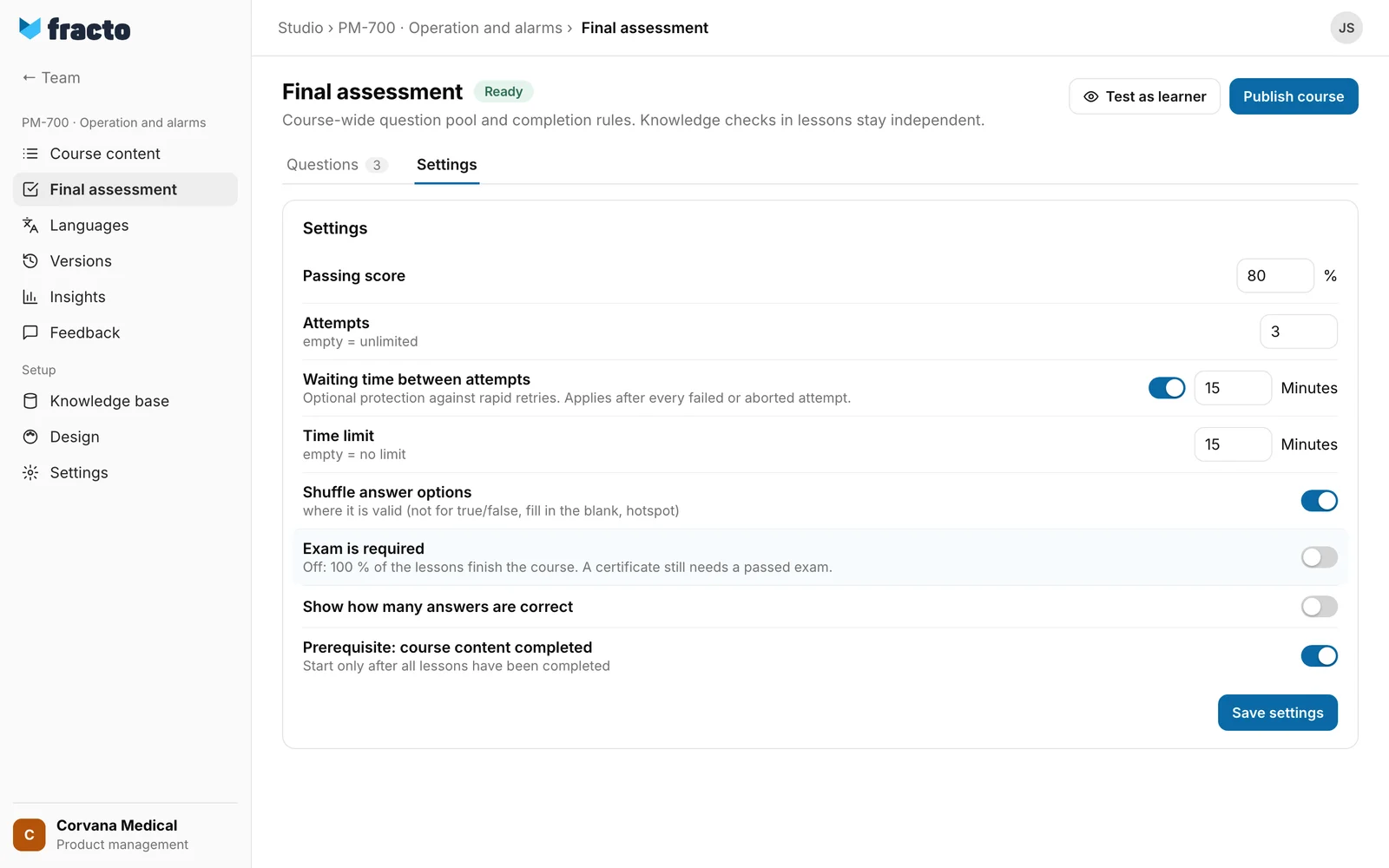
Open the course and choose Final assessment in the course navigation. Switch to the Settings tab.
-
Switch Exam is required off. The switch is on by default for every exam.
-
Click Save settings at the bottom.
-
Publish the course. If it was already published, this applies: the change affects how the exam is graded, so it cannot be published as a correction of an existing version. The publish dialog gives the reason “Changed grading or pass mark requires a new version.” See “Publish a course” and “Versions and corrections”.
You can tell it worked: “Settings saved.” appears and the switch is off. The note below (“Off: 100 % of the lessons finish the course. A certificate still needs a passed exam.”) is the switch’s hint text, not an error message. It is shown with the switch on as well.
What then applies to learners
- Course completion: the course counts as completed as soon as progress reaches 100 %, that is, all lessons are completed. The exam does not have to be passed. This applies only to course versions you publish after the change. Earlier versions keep their rule, and a version without the setting counts as required. Anyone who is already learning in an earlier version still needs the exam there.
- Certificate: it comes from a passed exam attempt. Without a passed exam there is no certificate, even if the course is already completed: if the person passes the exam later, the certificate is still issued.
- Course page in the Player: in the lesson list Final exam carries the badge Optional instead of Required, and Passed after passing. When all lessons are done and the exam is not passed, the notice Course completed appears: “You have completed all lessons. The final exam is optional. You need to pass it to receive a certificate.” The button Go to exam goes with it. In the list of trainings in the Player Final exam pending appears only for a required exam. See “Take the final exam”.
- Campus: a required assignment that points to the course counts as fulfilled once the course is completed, even without a passed exam.
- The other exam rules (passing score, attempts, waiting time, time limit, Prerequisite: course content completed) stay the same for everyone who takes the exam.
When the exam is required anyway
-
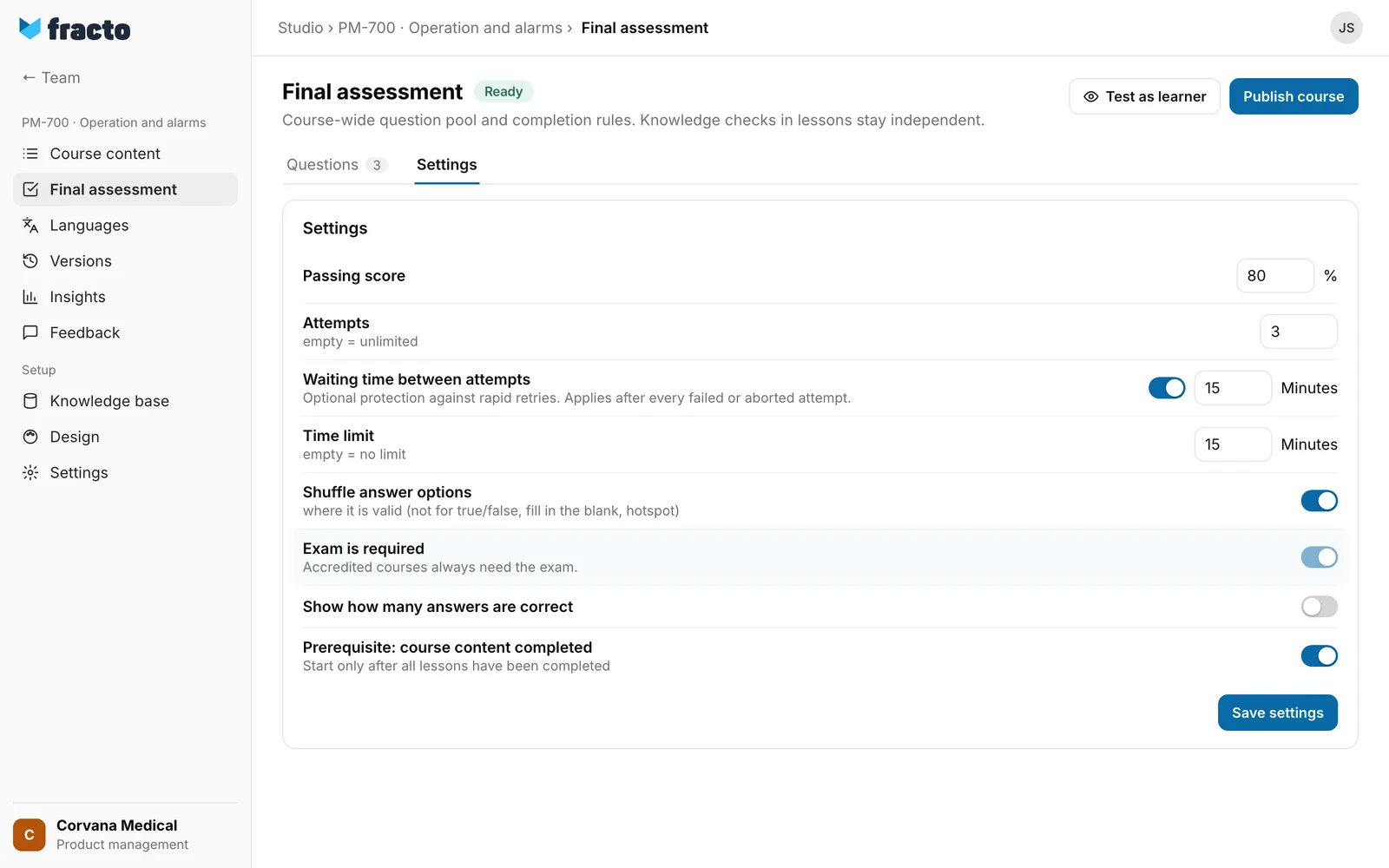
Accredited courses: The switch is then on and locked, with the note “Accredited courses always need the exam.” If you later switch on Accredited course in a course with an optional exam and save, Fracto sets the exam back to required when saving. See “Continuing education credits on the certificate”.
-
Refresher: If a person takes the course to refresh a certificate, they always need the exam, also after a reset of that run.
If it does not work
| Message | What it means |
|---|---|
| Settings could not be saved. | Saving failed. Try again. |
| Another person has changed this course in the meantime, so your latest change was not saved. Copy any text you want to keep before you load the current version. | The course changed during your action. Reload the page and switch again. |
Checked on 6 November 2026 against the current Fracto release.
