
Connect your own domain
How to connect your own domain to your workspace: reserve the domain, set the DNS records, wait for confirmation and make it the primary domain.
With your own domain, your learners and invitees reach the Player at your address, for example learn.corvana-medical.example, instead of the Fracto address. You add the domain in Hub and set up records at your DNS provider. Fracto checks them automatically.
Before you start
- You have the Administer workspace task in Hub. Fracto Support sees branding and domains read-only.
- You can change the domain’s DNS records, or someone in your IT does it for you.
- You need a complete domain without a path, ideally a subdomain such as learn.example.com. Domains under fracto.health and fracto.live are reserved for Fracto.
- A workspace can have at most ten domains. Domains that are still being removed count until cleanup has finished.
How to connect a domain
-
In Hub, open Organization and the Branding & domains tab. The Custom domains card is below the brand settings.
-
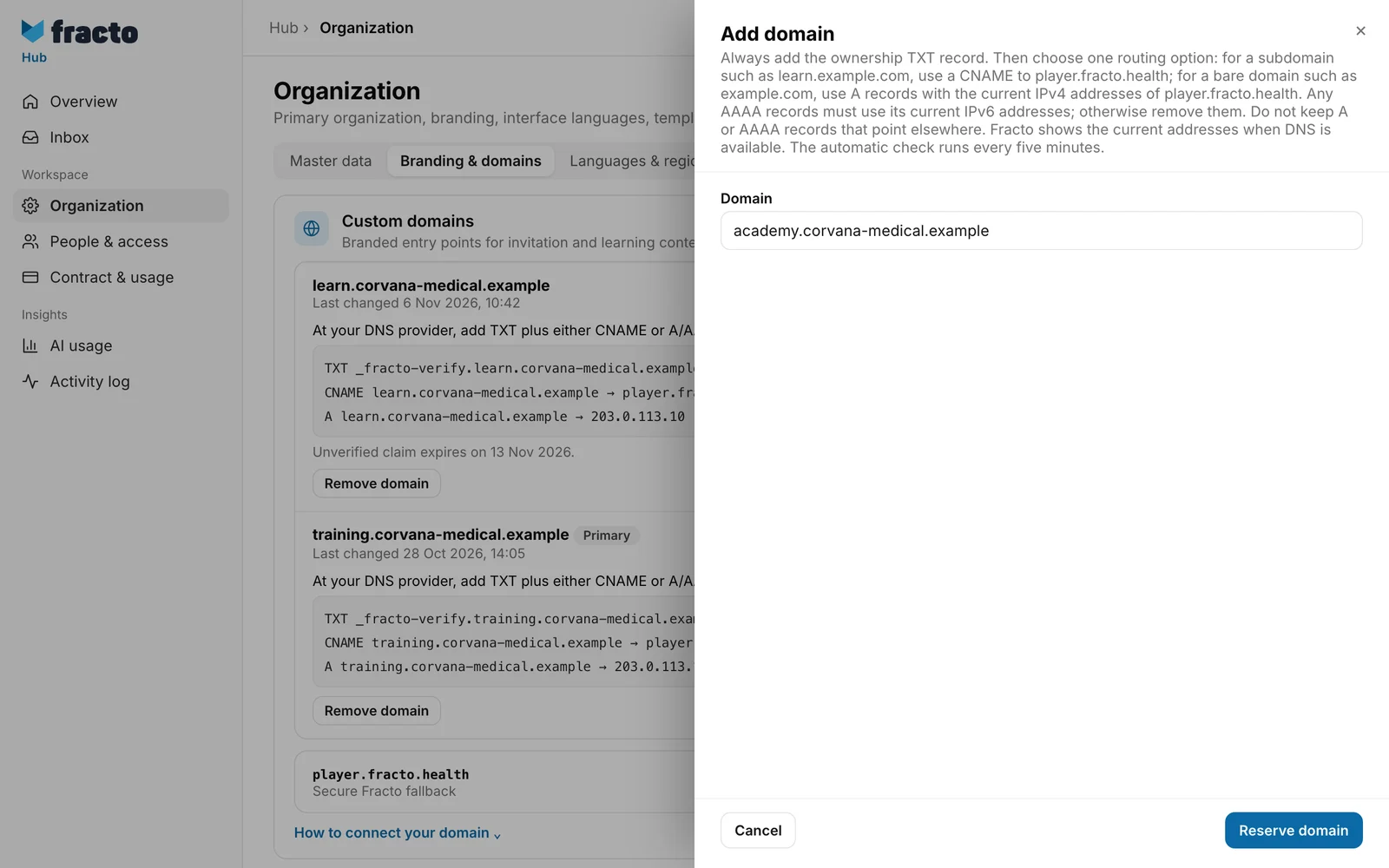
Click Add domain. In the panel, enter the Domain. Fracto cleans up an address with “https://” or a trailing slash. If the format is wrong, you see “Enter a complete domain without a path.” and the button stays blocked.
-
Click Reserve domain. Fracto reports “Domain was reserved.” and shows the domain in the list with DNS pending and SSL pending.
-
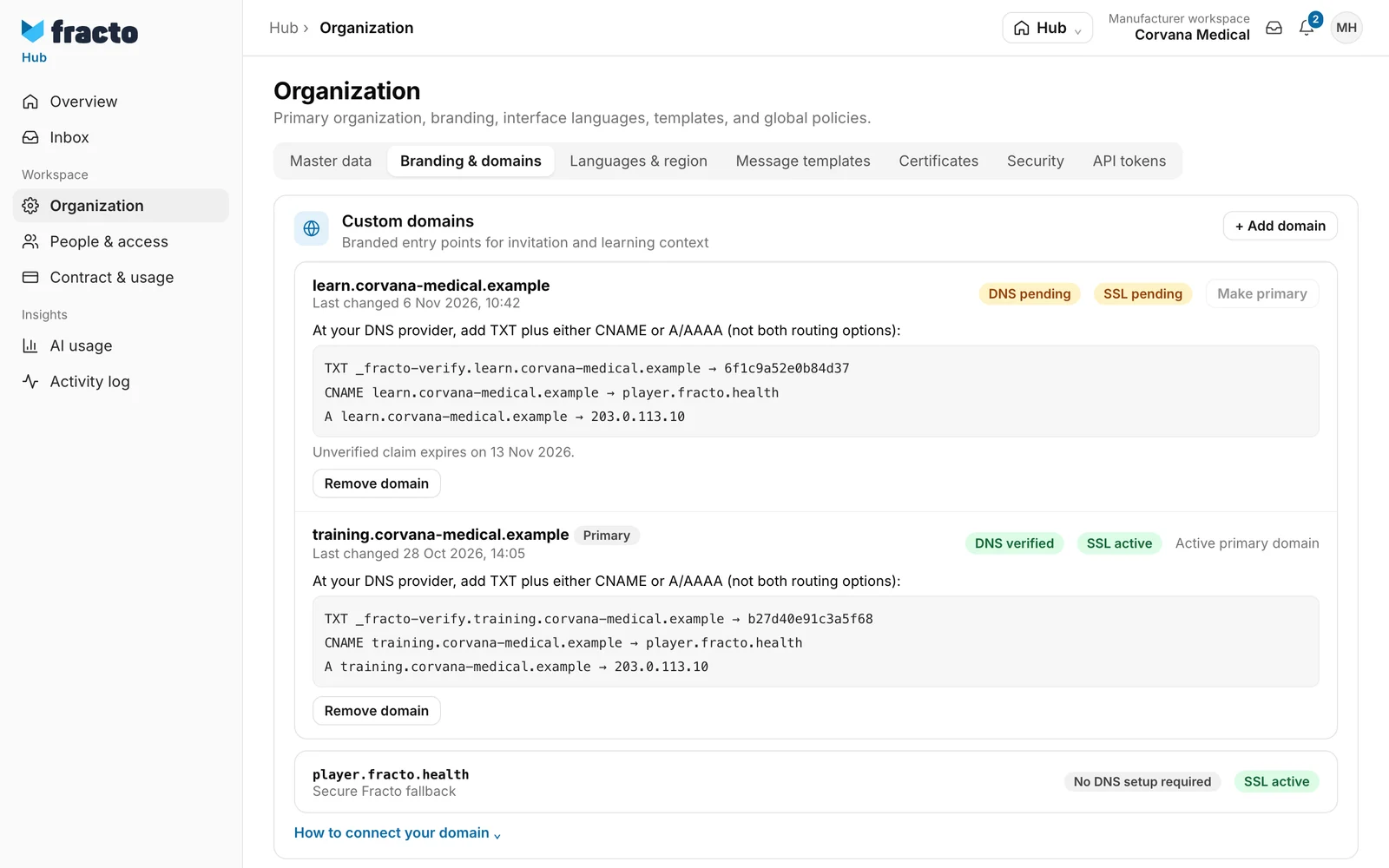
At your DNS provider, create the records shown under the domain:
- always the TXT record
_fracto-verify.<your domain>with the value shown. It proves that the domain is yours. - plus either a CNAME to
player.fracto.health(for a subdomain such as learn.example.com) or A records with the IPv4 addresses shown (for a bare domain such as example.com). Existing AAAA records must carry the IPv6 addresses shown, otherwise remove them. Remove A or AAAA records that point elsewhere. - Do not use both routing options.
- always the TXT record
-
Wait. Fracto checks the records automatically every five minutes. When they are right, DNS pending changes to DNS verified. Fracto then sets up the certificate, and SSL pending becomes SSL active. If the certificate fails, it says SSL failed.
-
If you want the domain as your primary domain, click Make primary on the verified domain. Fracto reports “Primary domain was updated.” The domain then shows Primary and Active primary domain.
How you know it worked
The domain shows DNS verified and SSL active. Only then is it reachable. Without your own domain, or while it is not verified, invitations and learning contexts stay reachable through the Fracto address player.fracto.health. That row always sits below your domains with No DNS setup required.
What happens next
- Only a verified domain leads to your workspace. Make primary works only for a verified domain.
- If a domain is never verified, the reservation expires after seven days. The list shows the date (“Unverified claim expires on …”). Fracto then removes the domain. You can reserve it again.
- If the records of a verified domain go missing later, Fracto waits at least two hours. If the check keeps failing that long, the domain counts as not verified again and is no longer primary.
- With Remove domain and the confirmation “Remove domain?”, Fracto revokes access through that domain immediately.
- Adding, changing the primary domain and removing appear in the Activity log. Verification, loss of verification after the grace period and expiry of the reservation appear there too, as an action of the system.
- If the workspace is deactivated or archived, no domain is verified, and verified domains lose their verification at the next automatic check, without the two-hour grace period.
If it does not work
| Message | What it means |
|---|---|
| Enter a complete domain without a path. | The format is wrong. Enter only the domain name, without a path. |
| Fracto domains are reserved. | Domains under fracto.health and fracto.live are not possible. |
| You can claim at most 10 domains in this workspace. Pending removals keep their slot until cleanup finishes. | The limit is reached. Remove domains you do not need and wait for cleanup. It is usually finished at the next automatic check. |
| The organization settings could not be processed. | A general message. One possible cause: the domain is already reserved in a workspace. Fracto does not name the reason. Check the spelling or use another domain. |
| Domain removal is still being completed. Try again after the next automatic check. | You have just removed the same domain. Wait for the next check. |
| Only a DNS-verified domain can become primary. | The Make primary button is active only at DNS verified. |
If DNS pending stays, compare the records at your DNS provider with the list in Hub. The TXT record is always required, and only one of the two routing options may be set.
Checked on 6 November 2026 against the current Fracto release.
